Friday, Dec 12, 2025 at 18:19
To make sure you get the right information quickly, I’ll reply here — and I’m happy to do so publicly so others can benefit as
well.
1. Setting your Track Log to be shareable
To share a Track Log, you must go into Edit and change its share status to either Shareable or Open:
Open = publicly visible to everyone
Shareable = only accessible to people you send the link to
For sharing on the
Forum, choose Open. Then simply copy the Track Log URL and paste it into your post using the LINK button. Anyone who clicks the link will be taken to the Track Log webpage. If they use the Traveller app, they can select Add to Shared and the Track Log will be added to their own
Track Logs list in the app.
2. What happens when you set a Track Log to “Open”
If you set it to Open, your Track Log immediately appears in the public
Track Logs library on the ExplorOz website. There are now over 7000 public
Track Logs shared by other users.
People can find public
Track Logs by browsing the map in this section of the website or by using keywords. For that reason, it’s worth giving your Track Log a clear name and a helpful description so others can find it easily. For example, yours might be better named something like “National Highway 1 – [region or direction]”, along with a descriptive summary.
3. Sharing privately
If you don’t want it public, set the Track Log to Shareable. This lets you send the link privately by email, messenger, or SMS. Only people with that link will be able to view it.
If you need help changing the share settings or naming your file, feel free to ask.
Michelle
AnswerID:
648762
Follow Up By: Member - shane r1 - Saturday, Dec 13, 2025 at 07:48
Saturday, Dec 13, 2025 at 07:48
Device Tracking from Robbo iPad saved 26/09/2025 3:35:48 PM
FollowupID:
930310
Follow Up By: Member - shane r1 - Saturday, Dec 13, 2025 at 09:06
Saturday, Dec 13, 2025 at 09:06
Hi Michelle,
Appreciate your help, and yes hopefully this helps others too.
As you can probably see I haven’t managed to find how to do this! I don’t see a LINK button?
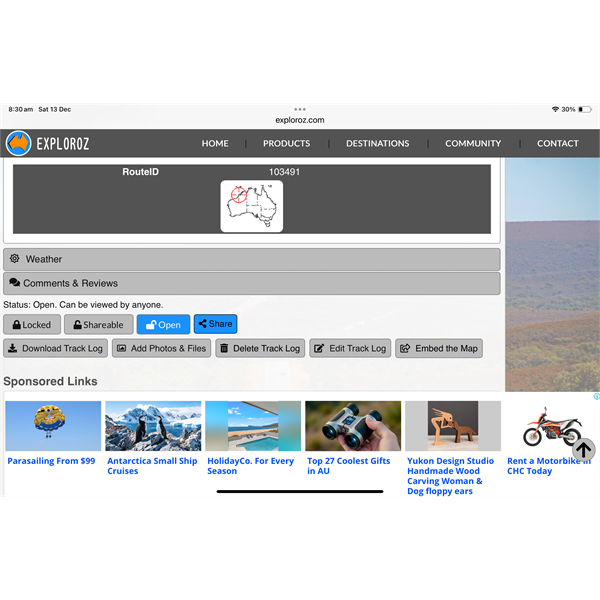
Track log
Sometimes I think I manage tech stuff and then……..
The
track logs are a brilliant way to record a trip , and I have used it a lot and want to do more with it , this one is the first I’ve attached photos to.
Thanks Shane
FollowupID:
930314
Follow Up By: ExplorOz - David & Michelle - Saturday, Dec 13, 2025 at 12:56
Saturday, Dec 13, 2025 at 12:56
Shane to insert a link into a
Forum post or reply you need to use LINK button below the box you are writing in - see my screenshot:
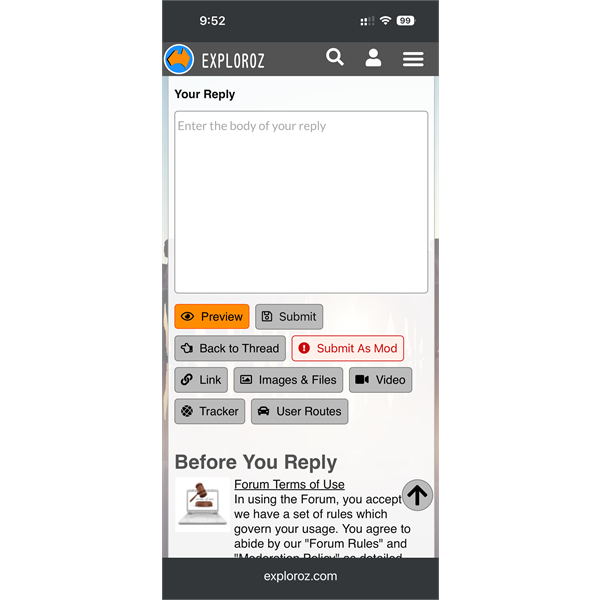
Forum reply box with buttons below to add links, images, youtube etc
FollowupID:
930321