Problem creating routes
Submitted: Friday, May 01, 2026 at 14:01
ThreadID: 152457
Views:121
Replies:2
FollowUps:1
Member - TroyR
Hi all, im creating a new route for a group trip, im finding when I try to enter a nav point it isn't routing to the point I want via a known track or road, it goes back and I get a
grey line pointing directly through the bush to the the point I want, I can't seem to get this thing to go straight along a track. I've tried to set shorter way points but that's really time consuming and I'd need dozens of them to work around this.
Ive attached a screen shot of what im getting once I set the waypoint
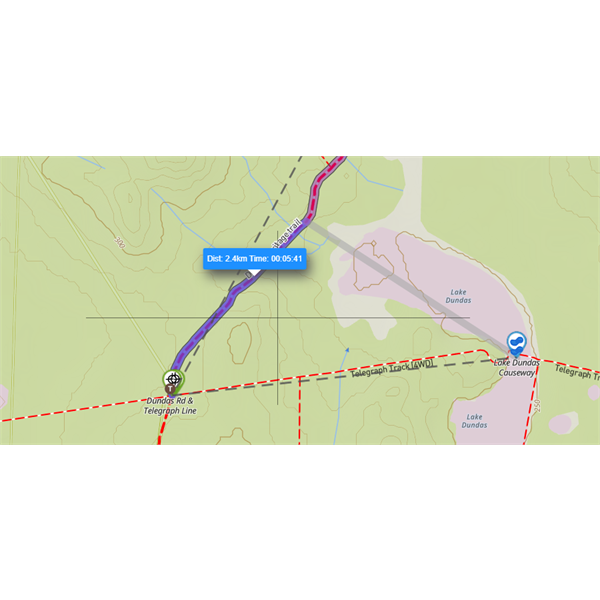
screenshot
Reply By: Member - Warren H - Friday, May 01, 2026 at 17:00
Friday, May 01, 2026 at 17:00
My understanding is if the track isn't in the database of roads used by the app, then you will get a straight line. If you change to cycling or walking you may have success.
AnswerID:
649194
Reply By: Member - TroyR - Friday, May 01, 2026 at 17:19
Friday, May 01, 2026 at 17:19
The track is showing, in the picture it shows as the Telegraph Track
AnswerID:
649195
Follow Up By: Member - nick boab - Friday, May 01, 2026 at 21:39
Friday, May 01, 2026 at 21:39
Edit.... can you show a larger picture showing waypoints where your route starts ie straight line section.
Also you could try changing to "Street" and see if track is showing up .. if not it will come up as a straight line only .
You may need to ask Michelle on the helpline
FollowupID:
930962