2025 Offline Maps
Submitted: Monday, Feb 03, 2025 at 08:30
ThreadID:
149575
Views:
2844
Replies:
3
FollowUps:
5
This Thread has been Archived
Howfree
I have bought and installed the 2025 map set on my iPad and now want to install them on my iPhone 13 Pro which currently has the 2023 map set but the install buttons are greyed out. I’m on the same home network with both devices.
I’m hoping I don’t have to pay for two sets. I haven’t had to previously…
Reply By: TrevorDavid - Monday, Feb 03, 2025 at 09:12
Monday, Feb 03, 2025 at 09:12
H
Have you updated the iPhone to the latest
ExplorOz Traveller version 9.2.1? And are logged in with exactly the same username as the iPad?
Regards
TrevorDavid
AnswerID:
647310
Follow Up By: Member - nickb boab - Monday, Feb 03, 2025 at 10:11
Monday, Feb 03, 2025 at 10:11
Howfee . you only need one license for multiple devices .
You also may need to sync data and all permissions
FollowupID:
928269
Follow Up By: Howfree - Monday, Feb 03, 2025 at 11:11
Monday, Feb 03, 2025 at 11:11
Yes, logged in the same and using same version. Thanks.
FollowupID:
928270
Follow Up By: Howfree - Monday, Feb 03, 2025 at 11:14
Monday, Feb 03, 2025 at 11:14
Have auto sync turned on in Data Manager. Is that what you mean?
How /where do I sync permissions please?
FollowupID:
928271
Follow Up By: Member - nickb boab - Monday, Feb 03, 2025 at 11:18
Monday, Feb 03, 2025 at 11:18
I think you'll need to set and agree to the way it's recommended all permissions manually .
I had trouble cause I hadn't agreed to photos video etc .
FollowupID:
928272
Reply By: Howfree - Monday, Feb 03, 2025 at 11:27
Monday, Feb 03, 2025 at 11:27
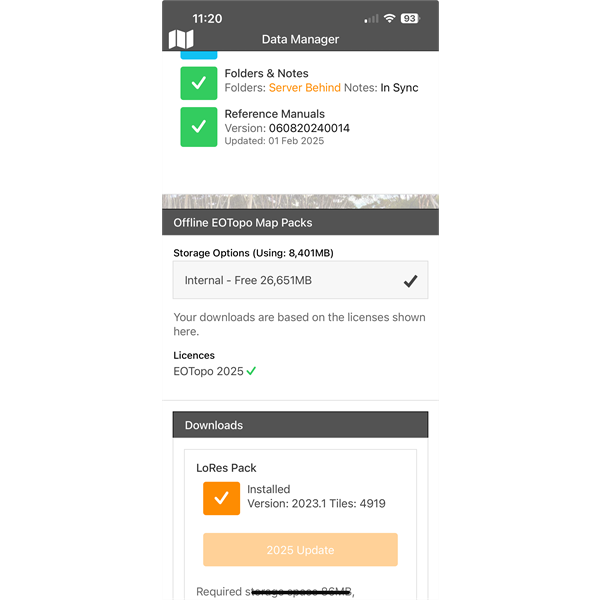
Screenshot from iPhone
Could this “server behind” message have anything to do with it?
I’ll need to go through the help pages to find how to set permissions…
AnswerID:
647311
Follow Up By: Howfree - Monday, Feb 03, 2025 at 11:40
Monday, Feb 03, 2025 at 11:40
I have used the “CLEAR CONTENT” button and everything is reloading (downloading) as it should. Must have been the “server behind” issue.
Thanks for the help guys. ??
FollowupID:
928273
Reply By: Charlotte M - Wednesday, Mar 12, 2025 at 13:39
Wednesday, Mar 12, 2025 at 13:39
Sometimes, a simple restart can refresh the app and allow the maps to be installed.
AnswerID:
647575