Tablet Connectivity Problem
Submitted: Friday, Jul 18, 2025 at 12:36
ThreadID:
151080
Views:
2118
Replies:
9
FollowUps:
9
This Thread has been Archived
Member - Teched
Hi, I have two questions frustrating me with Exploroz - pictures supplied.
1. Why does my new Samsung keep having trouble connecting to Exploroz where the older one next to it has no problems? I can surf the net on both and they are both connected to the same wifi which is 50cm away. I tried wiping all the data, deleted it and reinstalled it, now it just stops at step 2 login: 'you are currently offline' so now it is totally unusable? I've talked to Samsung online and my internet provider, and neither see a problem but Samsung just said drop it in for checking/repair? It's 7 months old, the other one is 4 years old.
2. Why is the internet status red on both tablets. I tap it which supposedly resets it but it does nothing? If I tap on the GPS icon, it changes from
orange to red and back. The wifi icon just stays red?
Help, Ed
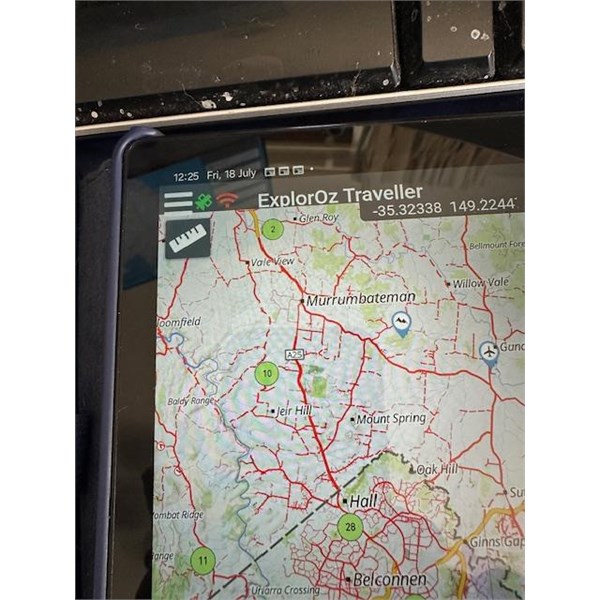
Tablet showing red icon
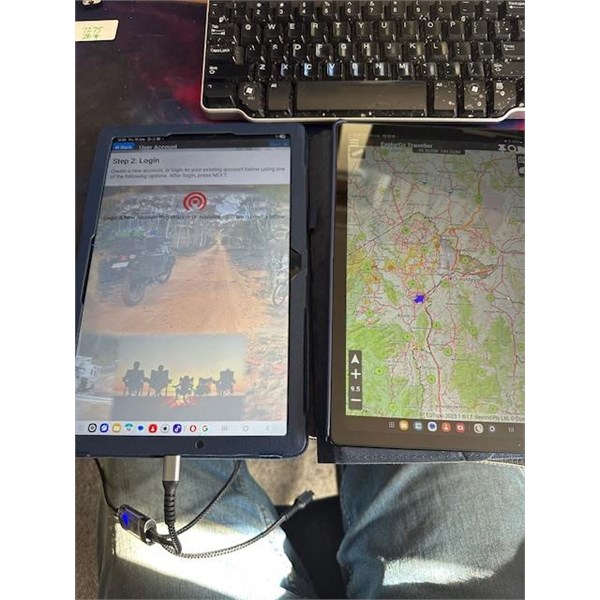
Tablets - 1 offline?
Reply By: Member - Dick L - Friday, Jul 18, 2025 at 14:11
Friday, Jul 18, 2025 at 14:11
Cannot tell from your photos but have you turned on the Tablets Wi-Fi.
AnswerID:
648289
Reply By: Member - Teched - Friday, Jul 18, 2025 at 14:42
Friday, Jul 18, 2025 at 14:42
Yes, as I said - ' can surf the net on both and they are both connected to the same wifi which is 50cm away'.
I have also tried 3 different types of wifi connections, no fix.
AnswerID:
648290
Reply By: Member - Dick L - Friday, Jul 18, 2025 at 15:10
Friday, Jul 18, 2025 at 15:10
Does the tablet have a sim card for phone usage. If so then you are connecting through that and not the Wi-Fi.
The wi-fi symbol is red so you are not connected to wi-fi and if the tablets wi-fi setting are turned on then you may have a dud tablet.
AnswerID:
648291
Reply By: Member - Teched - Friday, Jul 18, 2025 at 15:22
Friday, Jul 18, 2025 at 15:22
No sim card. The new tablet's wifi settings are turned on and all other programs work. I can surf the net on google but Exploroz now won't even let me reinstall, just stops at step 2 login failure as shown above? I'm happy to send it back for checking as it's under warranty but everything else works?
AnswerID:
648292
Reply By: Bricky - Friday, Jul 18, 2025 at 16:38
Friday, Jul 18, 2025 at 16:38
Are both tablets cellular. My understanding is a cellular tablet has a built in gps whereas the wifi only models connect through the network. Maybe try turning wifi off in both and see what happens.
AnswerID:
648293
Follow Up By: Member - nick boab - Friday, Jul 18, 2025 at 22:09
Friday, Jul 18, 2025 at 22:09
Incorrect, samsung wifi models have a built-in GPS.
FollowupID:
929569
Reply By: Member - Teched - Friday, Jul 18, 2025 at 16:40
Friday, Jul 18, 2025 at 16:40
I think it's still my internet provider and/or their router. I took it down to officeworks and it logs on fine on their network and downloads the files. I came home and tried it on my mesh hub that is hard wired into the router, and it works fine. So looks like the router wifi. I'll reset it and if that doesn't work, replace it.
AnswerID:
648294
Follow Up By: Member - Bigfish - Friday, Jul 18, 2025 at 18:47
Friday, Jul 18, 2025 at 18:47
I routinely turn my router on and off every 3-4 months. They can develop a memory issue and a restart can help clear any gliches that may not even appear. Bit like removing earth cable on a car to clear some fault codes..
FollowupID:
929568
Reply By: Member - Teched - Friday, Jul 18, 2025 at 19:12
Friday, Jul 18, 2025 at 19:12
I do the same. I've also rebooted the router 10 times this week with TPG and Samsung Technical support trying to problem solve. I've just reset it and it's gone back to factory defaults but won't let me login with 192.168.1.1 or .0.1 so I'm waiting on a tpg callback again. Otherwise, I'll buy a new modem.
AnswerID:
648295
Follow Up By: Member - nick boab - Friday, Jul 18, 2025 at 22:32
Friday, Jul 18, 2025 at 22:32
Teched . Off Topic but it's best to reply to a comments made by tapping on the follow up box & not starting a new comment as it can become confusing ,It also helps to mention the name your talking to , cheers
FollowupID:
929570
Reply By: Member - McLaren3030 - Saturday, Jul 19, 2025 at 08:17
Saturday, Jul 19, 2025 at 08:17
Hi Teched,
As this is a very technical issue, perhaps you might want to log this with the help desk for Michelle and David to have a look at.
Macca.
AnswerID:
648296
Follow Up By: ExplorOz - David & Michelle - Saturday, Jul 19, 2025 at 09:03
Saturday, Jul 19, 2025 at 09:03
He has - but he has ascertained he has a connectivity issue localised to one of his tablets unrelated to Traveller.
FollowupID:
929571
Reply By: ExplorOz - David & Michelle - Saturday, Jul 19, 2025 at 09:07
Saturday, Jul 19, 2025 at 09:07
Did you try Googles suggested fix which is go to your Settings app - Apps - Google Playstore - Storage - Clear Data ? Repeat with Google Play
Services?
There seems to be a Google glitch happening at the moment and this is the fix we found.
Michelle
AnswerID:
648297
Follow Up By: Member - nick boab - Saturday, Jul 19, 2025 at 09:30
Saturday, Jul 19, 2025 at 09:30
D&M , could it have anything to do with permissions when setting up ? I know you say it's critical when setting it up from the start for the app to work correctly .
Also you can pick up some handy hints by watching the tutorials on YouTube .
I was going to suggest uninstall app ,turn off and power down the tablet then reset the tablet to default settings and start again from Fresh . following the setting up instructions exactly as suggested . I think this trips-up some people when setting up from the start
FollowupID:
929572
Follow Up By: Member - Teched - Saturday, Jul 19, 2025 at 11:49
Saturday, Jul 19, 2025 at 11:49
Hi Nick, thanks for letting me know to add name and post folowup. I didn't know that as I'm new to this, I'm used to commenting on Facebook.
The tablet and install are not the problem. It worked straight away at Officeworks on their wfi. So I tried to reinstall it and then it wouldn't reinstall on my ADSL wifi and wouldn't connect, but would connect to the mesh wifi that was hardwired to the adsl unit. After another hour with TPG this morning, they reset from their end again and it's now working on the ADSL wifi. It seems to be a TPG or my modem problem, they only reset it 3 days ago so they have prioritised it to monitor ad replace modem if it happens again.
FollowupID:
929573
Follow Up By: Member - nick boab - Saturday, Jul 19, 2025 at 13:14
Saturday, Jul 19, 2025 at 13:14
Teched : I could understand it if it wasn't downloading data with the ADSL i.e "copper cable" ?? I have had issues downloading the data pack when the internet is running slow at in the past , but I don't know if that would affect your internet connection to the tablet ?
When you have mention "explorOz" is that for the Traveler app or are you referring to the main ExplorOz website ? because that takes a bit of juice to get it going .
Are you aware of the ExplorOz Traveller App Facebook page aswel .
FollowupID:
929574
Follow Up By: Member - Teched - Saturday, Jul 19, 2025 at 13:55
Saturday, Jul 19, 2025 at 13:55
Hi Nick, thanks for all the helpful comments.
Using the
Exploroz Traveller App on my Samsung tablet. Yes, copper cable, all coming down 2 little wires at the max range supported of 4.5kms from the Telstra Box, however hardwired to the ADSL I do get 45mb downloads and 10mb uploads so when it works it's good. The problem is wifi in my adsl modem is playing up so hopefully they will give me a new unit soon and then the NBN say sometime later this year or early 2026 I will have fibre to the node as it's in my street.
Yes, I do know the Facebook site, I probably should use it more but Michelle is great and quick to respond.
Cheers Ed
FollowupID:
929577
Follow Up By: Member - Jim S1 - Saturday, Jul 19, 2025 at 14:43
Saturday, Jul 19, 2025 at 14:43
" Michelle is great and quick to respond."
Very true .
Cheers
Jim
FollowupID:
929579