How to create cycling treks using rail trails
Submitted: Wednesday, Jul 30, 2025 at 07:19
ThreadID:
151165
Views:
2098
Replies:
4
FollowUps:
2
This Thread has been Archived
Member - Crankster
I was looking over the 2025 Topo maps planning an upcoming trip. I’m mixing in some bikepacking and have been using the ‘cycling’ option which is great. However, I’ve noticed that whilst the maps show and recognise the growing network of railtrails, it wont let you use them for route planning or if there is, I don’t know how. Has anyone managed this?
Reply By: Member - nick boab - Wednesday, Jul 30, 2025 at 20:36
Wednesday, Jul 30, 2025 at 20:36
It works for me , I use waypoints & poi alone the route I'm creating.
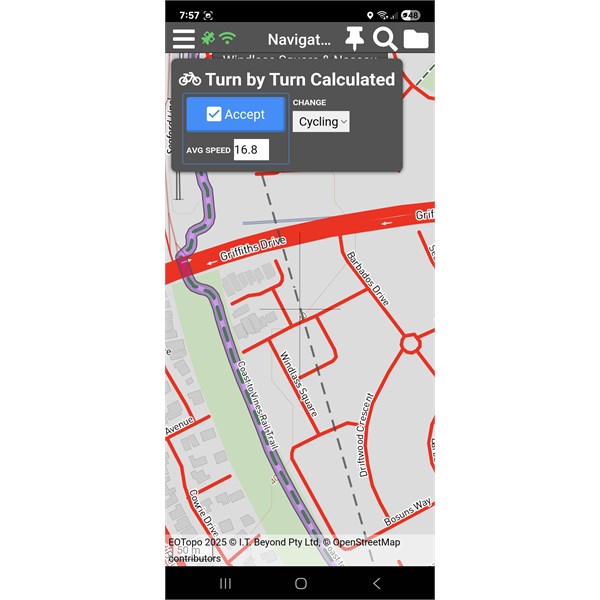
Bike track 1
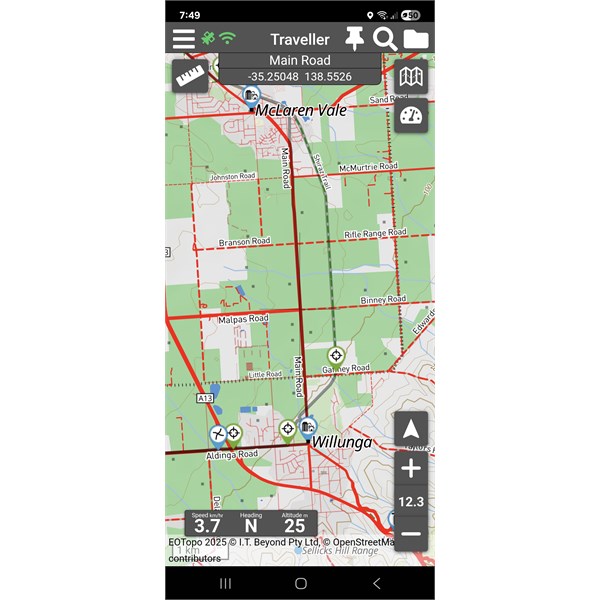
Bike track Shiraz trail
AnswerID:
648342
Reply By: Member - peter g28 - Wednesday, Jul 30, 2025 at 20:42
Wednesday, Jul 30, 2025 at 20:42
The cycling option in route planning is the transport option you are using when you plan between 2 way points, eg, you can either use a vehicle, cycle or walking.
What is interesting, is that the route between these the two way points will be relevant to each mode of transport..ie a car will go a different route than a bicycle or walking.
So if the route between two way points, is difficult to plan under the transport mode of"cycle"..because the Traveller App is auto picking a different route to what you want to travel, due to the mapping data..ie some tracks may be closed to cycling but not to walking. So try using "walking" and put in couple more way points between these two designated waypoints and see hoe that goes.
AnswerID:
648343
Follow Up By: Member - nick boab - Wednesday, Jul 30, 2025 at 21:09
Wednesday, Jul 30, 2025 at 21:09
This is also handy when planning a driving route and it won't follow the route you want it to take by changing to cycling you can get it to follow the route you wish it to take .
There are tutorials available for this .
FollowupID:
929614
Reply By: Member - Crankster - Friday, Aug 01, 2025 at 23:11
Friday, Aug 01, 2025 at 23:11
Thanks everyone for your thoughts. I’ve been playing with the great southern rail trail here in Vic. It meanders between towns and often alongside major roads. I get that the rail trail has breaks as it enters towns which includes short road sections. I am able to force it to use sections of the rail trail by creating waypoints. However, the number of points I need to make gets tedious very quickly. In practice, I don’t need a detailed route to follow it but it is an interesting exercise. I have tried something similar with google maps and the way it generates a trek/route is different. It makes many points along the way that enables you to grab a section of the trek and manually drag it across to a road or track that you want to travel. This then forces the map to recalculate. This is much more intuitive and easier to do and would be great in EO
AnswerID:
648353
Follow Up By: Member - nick boab - Saturday, Aug 02, 2025 at 11:24
Saturday, Aug 02, 2025 at 11:24
Have you changed your mode of transport in navigation to walking or you might get away with cycling but walking would be best then you should not need to many waypoints . I have tried your route and it works pretty
well for me with a few exceptions where roads are near to the rail . Making sure that your way points are right on the old rail line trail ( zoom in ) if it doesn't follow the correct route tap on walking mode and hit discard and try again . You can change your average speed when in walking if you would like a more accurate time for the journey .
FollowupID:
929626
Reply By: Member - Crankster - Tuesday, Aug 05, 2025 at 10:58
Tuesday, Aug 05, 2025 at 10:58
Thanks Nick, I must confess that I haven’t tried the walking option. I’ll have a play with that. I do like that you can adjust your target average speed which is a great ‘fine tune’ feature. I’ll try exporting some GPX files to see how many data points the trek feature is generating just out of interest.
AnswerID:
648375