Volume Control
Submitted: Tuesday, Sep 16, 2025 at 17:56
ThreadID:
151575
Views:
5756
Replies:
4
FollowUps:
24
This Thread has been Archived
mepvic
Hi all. Using the Traveller navigation system for the first time.
Can anyone advise how to turn up the volume on the directions ?
Thanks
Reply By: Member - nick boab - Wednesday, Sep 17, 2025 at 02:47
Wednesday, Sep 17, 2025 at 02:47
That might be > sounds and vibrations in your devices > settings ??
AnswerID:
648525
Follow Up By: Member - nick boab - Monday, Sep 29, 2025 at 07:28
Monday, Sep 29, 2025 at 07:28
Mepvic : here's a suggestion on how to connect your phone to your 200 series LC audio system using a USB charger cord from the USB port on your console near the gear stick .
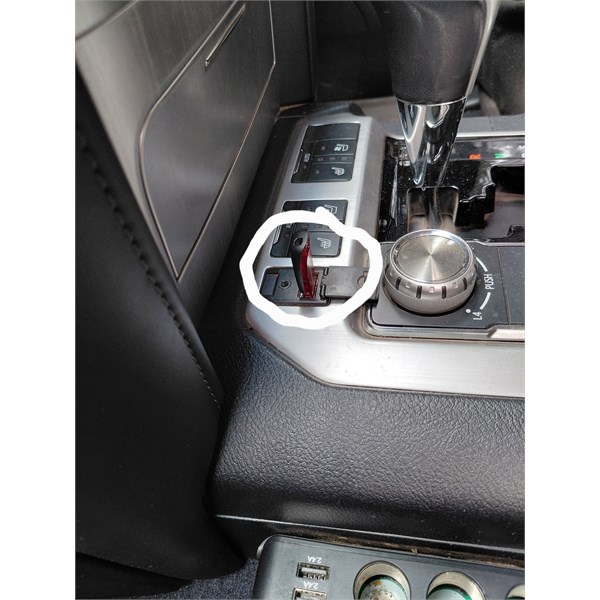
Usb port centre console
Connecting your phone to this port then press audio on your cars console the source panel should appear.
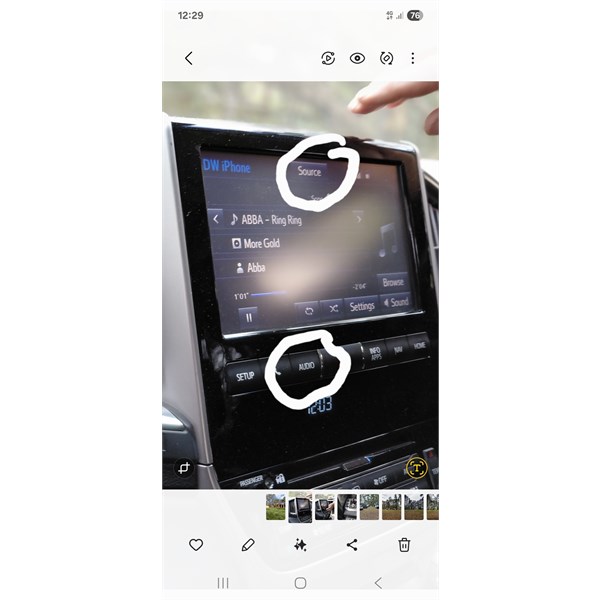
200 series audio system
pressing on that should show your phone in the catalogue press on that should then connect your phone to the cars audio system
You can do this via Bluetooth but you were saying that you are NOT technically minded and this might be an easier way for you .
Give this a go it may help . A friend showed me how to do it briefly on his 200 series LandCruiser .
FollowupID:
929968
Follow Up By: mepvic - Monday, Oct 06, 2025 at 19:04
Monday, Oct 06, 2025 at 19:04
Thanks Nick. Just got your post.
I do not have the usb port near the gear selector. Our LC is a 2015 200 series. Only usb port is beside the radio that we are using for our audio books.
I’ll play around when we get back.
Thanks
Mepvic
FollowupID:
929995
Reply By: Member - LeighW - Wednesday, Sep 17, 2025 at 08:20
Wednesday, Sep 17, 2025 at 08:20
I had a quick look and can't see a volume control in the app sp it would seem you
will need to turn the volume up on your device. Android devices etc just turn up
the volume, or you can go into settings sounds etc and turn up the media or possibly
system volume etc.
AnswerID:
648526
Reply By: Member - Bigfish - Wednesday, Sep 17, 2025 at 08:32
Wednesday, Sep 17, 2025 at 08:32
Volume control has nothing to do with app. Its your unit that controls the volume output..
AnswerID:
648527
Reply By: mepvic - Wednesday, Sep 17, 2025 at 18:45
Wednesday, Sep 17, 2025 at 18:45
Thanks all. Have played with the volume controls on the tablet and in the tablet settings.
Has increased the volume slightly but for a deaf old man could still be louder. Have to rely on the map rather than the directions from the lady.
Thanks again.
AnswerID:
648532
Follow Up By: Member - Bigfish - Thursday, Sep 18, 2025 at 09:01
Thursday, Sep 18, 2025 at 09:01
You might be able to add a bluetooth speaker..I never use the voices from any mapping app..bloody annoying!!
FollowupID:
929906
Follow Up By: mepvic - Thursday, Sep 18, 2025 at 10:21
Thursday, Sep 18, 2025 at 10:21
Thanks Bigfish.
Deaf old men and Bluetooth technology don’t go hand in hand.
Will just look at the map and make my own decision whether I need to take the second exit or the third.
FollowupID:
929907
Follow Up By: Member - nick boab - Thursday, Sep 18, 2025 at 15:09
Thursday, Sep 18, 2025 at 15:09
Maybe you could Bluetooth the device to the car if compatible , I have a 2012
Ranger and I can use Google Maps through the speakers with my phone. But I haven't tried it with the Traveller through the car speaker , will have to give that a go at some stage .
I also have found the tablet is a bit quiet for this purpose .
FollowupID:
929908
Follow Up By: mepvic - Thursday, Sep 18, 2025 at 19:15
Thursday, Sep 18, 2025 at 19:15
Thanks Nick. Too much technology. Will just turn up the volume on my hearing aid.
FollowupID:
929909
Follow Up By: Garry L - Thursday, Sep 18, 2025 at 19:59
Thursday, Sep 18, 2025 at 19:59
Nick
"I have a 2012
Ranger and I can use Google Maps through the speakers with my phone."
My work ute is a 2012
Ranger XLT and tried using google maps a couple times with no success on the sound side of things - how do you get it to work though the speakers if you don't mind ?
Cheers
Gazz
FollowupID:
929910
Follow Up By: Member - nick boab - Thursday, Sep 18, 2025 at 20:18
Thursday, Sep 18, 2025 at 20:18
Garry : I'm not 100% sure on how now I got it to work but I think you don't have it on radio, auxiliary maybe . I've got a parkmate now & it works through that , it's been a while since I've use it . If I remember how I did it I'll let you know .
FollowupID:
929911
Follow Up By: Garry L - Thursday, Sep 18, 2025 at 20:57
Thursday, Sep 18, 2025 at 20:57
Thanks Nick
I did get it to work once many years ago but it wasn't something I really needed at the time. My bad memory thinks I had to turn off bluetooth or something else to make it work.
Cheers
Gazz
FollowupID:
929912
Follow Up By: Member - nick boab - Thursday, Sep 18, 2025 at 21:54
Thursday, Sep 18, 2025 at 21:54
Garry : my experience was similar , sometimes it would work and then ... I couldn't get it to talk to me , aways thought it was on mute or something till I realised what it was... haha :))
Edit also incoming call come over the top of navigation.
I have enough trouble getting the clock off 24 hours haha... that really does my head in .
I got the parkmate thinking I could run the Traveller app on it aswel fulltime reverse camera but that was unsuccessful using it for the Traveller app ,
The parkmate ~ "head unit" , will mimic my phone i.e for Google maps phone and text message to some degree .
FollowupID:
929913
Follow Up By: Member - nick boab - Friday, Sep 19, 2025 at 13:21
Friday, Sep 19, 2025 at 13:21
Garry :. Have it on auxiliary>press auxiliary again ,comes up with Wi-Fi type signal on the screen , that's when it works through the car speakers . Give it a go .
FollowupID:
929915
Follow Up By: Garry L - Friday, Sep 19, 2025 at 17:48
Friday, Sep 19, 2025 at 17:48
Nick
I actually did that this morning before reading this post and after pressing auxiliary a second time it said
" device not recognised"
Pressing auxiliary twice is exactly what I have to do to listen to music on my trusty old ipod
Will have another play tomorrow and thanks for your efforts with this
Cheers
Gazz
FollowupID:
929916
Follow Up By: Member - nick boab - Friday, Sep 19, 2025 at 17:54
Friday, Sep 19, 2025 at 17:54
Garry , so on
mine when I press auxiliary get my iPod music when I press it again I get "not recognised" and that is when i see the Wi-Fi signal and that's when it will talk to me .
Do you have your iPod plugged in to the USB down low under the center part of the console in the middle ?
FollowupID:
929917
Follow Up By: Garry L - Friday, Sep 19, 2025 at 18:10
Friday, Sep 19, 2025 at 18:10
"Do you have your iPod plugged in to the USB down low under the center part of the console in the middle"
Yep !
Some research I have done on this say I have to plug my phone into that usb port via a cable and others say you don't !
This is something I don't really have to have but now I've started the ball rolling I need to get it to work lol
Cheers
Gazz
FollowupID:
929918
Follow Up By: Garry L - Friday, Sep 19, 2025 at 18:25
Friday, Sep 19, 2025 at 18:25
Nick
Just went out and tried again - this time the wi-fi symbol came up and the screen said " Not Provided " but when I pressed start on maps VOILA the lady started talking through the speakers ( without cable )
Owe you a beer mate !!
Now Nick - are you any good with EO Traveller as I really struggle with that in my other 4wd :)
Cheers
Gazz
FollowupID:
929919
Follow Up By: Member - nick boab - Friday, Sep 19, 2025 at 19:24
Friday, Sep 19, 2025 at 19:24
Garry, glad you had success.
There's alot smarter people around than me on Traveller , the Facebook page is good if you have Facebook. Thats where I normally ask questions on Traveller problem.
But you can always ask here on problems .
Personal i think the Traveller is great.
More you mess around with it the better you understand it .
Look forward to hearing from you on that .
FollowupID:
929920
Follow Up By: Garry L - Friday, Sep 19, 2025 at 19:31
Friday, Sep 19, 2025 at 19:31
Thanks Nick and good luck with you clock lol
FollowupID:
929921
Follow Up By: Member - nick boab - Saturday, Sep 20, 2025 at 17:24
Saturday, Sep 20, 2025 at 17:24
Mepvic, There should be members here that could give you instructions on how to have the navigation instructions to come through the car speakers aswel you probably have some close friends who could help you set it up . It would be worth your trouble if you are going to use this on a regular basis Note: even better you could probably ask the help desk David and Michelle have a 200 series.
FollowupID:
929930
Follow Up By: mepvic - Monday, Sep 22, 2025 at 08:48
Monday, Sep 22, 2025 at 08:48
Thanks Nick
On the road for the next 4 weeks.
Will look at it when we get back. Sounds like it could be done. Our 200 series is a 2015 model.
FollowupID:
929947
Follow Up By: Allan B (Sunshine Coast) - Monday, Sep 22, 2025 at 10:52
Monday, Sep 22, 2025 at 10:52
.
Nick, they are all over on the "Temporary Power" thread. lol
FollowupID:
929948
Follow Up By: Member - nick boab - Monday, Sep 22, 2025 at 11:22
Monday, Sep 22, 2025 at 11:22
thanks Allan, i hope you're not creating mischief over there LOL :))
FollowupID:
929949
Follow Up By: Allan B (Sunshine Coast) - Monday, Sep 22, 2025 at 11:46
Monday, Sep 22, 2025 at 11:46
.
Moi??
FollowupID:
929950
Follow Up By: Garry L - Monday, Sep 22, 2025 at 14:19
Monday, Sep 22, 2025 at 14:19
"they are all over on the "Temporary Power" thread. lol"
Yeah - some not very happy campers on that thread :)
FollowupID:
929952
Follow Up By: Allan B (Sunshine Coast) - Monday, Sep 22, 2025 at 14:37
Monday, Sep 22, 2025 at 14:37
.
I have stopped watching that thread for fear of being dragged into the ring! :(
FollowupID:
929953