Shared Trek to Personal Trek ?
Submitted: Saturday, Oct 04, 2025 at 08:36
ThreadID:
151659
Views:
1551
Replies:
3
FollowUps:
4
This Thread has been Archived
Member - Mark B68
Once you have have imported/opened a SHARED Trek how do yo change it to a Personal Trek ?
| Mature Couple - waiting to make the BIG STEP to go travel this big country of ours.
Background of Military Service, Medical and ITMember
My Profile My Position Send Message |
Reply By: ExplorOz - David & Michelle - Sunday, Oct 05, 2025 at 22:08
Sunday, Oct 05, 2025 at 22:08
Only Treks you create will appear in the Personal tab - but ones you've received via the Add to Shared will be in the Shared list. You can still use it exactly as if it was a Personal Trek except you cannot EDIT it. If the owner changes it, you also get the change via auto sync. Shared Treks are ideal for trip leaders distributing a master copy to all participants as it auto updates when changes are applied by the owner. It's perfect for clubs and convoys. Tons of 4WD clubs have all members using
ExplorOz Traveller now as a result of this feature. It's so easy now for trip leaders and groups travelling together.
By default the app doesn't apply filters so your Treks list will show ALL TREKS. You can apply a filter to show any combination of ExplorOz, Personal, and/or Shared as per the screenshot. Other than that - no difference in operation/use except you cannot then reshare that Trek, or edit it.
Hope that helps.
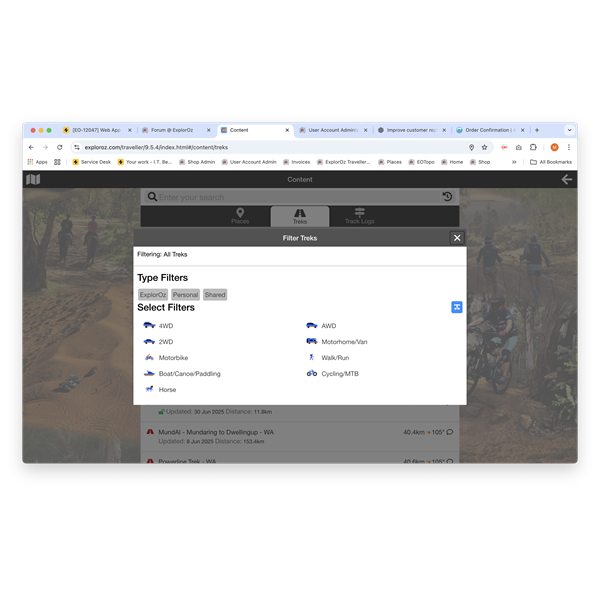
Screen shot of Trek Filter options
AnswerID:
648574
Reply By: Member - Dick L - Monday, Oct 06, 2025 at 10:16
Monday, Oct 06, 2025 at 10:16
If you save it with a new different name it will become a personal trek and you can then modify it to your liking.
AnswerID:
648575
Follow Up By: ExplorOz - David & Michelle - Tuesday, Oct 07, 2025 at 10:17
Tuesday, Oct 07, 2025 at 10:17
No, this isn’t possible with Shared Treks — there’s no Edit button available. You can do this with
Track Logs, but not with Shared Treks.
FollowupID:
929996
Follow Up By: Member - Dick L - Tuesday, Oct 07, 2025 at 12:11
Tuesday, Oct 07, 2025 at 12:11
ExplorOz When I go Looking Glass - Treks. I see my personal treks and a long list of other treks. So, you are saying these are
Track Logs not Treks. If that is the case why are they in Treks and not
Track Logs.
FollowupID:
929997
Follow Up By: ExplorOz - David & Michelle - Tuesday, Oct 07, 2025 at 14:57
Tuesday, Oct 07, 2025 at 14:57
In search there are 3 tabs -
Places, Treks,
Track Logs so depending which tab is selected will show a list of that type of data.
All Im saying is that Shared Treks are different to Personal Treks - you dont have an EDIT option to modify a Trek that is shared with you, which is what I corrected in your statement to Mark.
I possibly made it more confusing by mentioning
Track Logs - which are a different type of file altogether and as such don't behave the same way as Treks. I suspected that you knew that if using a shared Track Log you could indeed edit the name and it would appear in your Personal
Track Logs but my comment is that you do not have this option in SHARED TREKS.
Sorry if my reply was more confusing than helpful - but the answer is in the detail.
FollowupID:
929998
Reply By: Member - Mark B68 - Sunday, Oct 12, 2025 at 09:49
Sunday, Oct 12, 2025 at 09:49
What would be good is if you could import/download updated TREK and convert to personal trek when imported instead of having to go over it and re-create ? or am I doing something wrong and it converts it to personal TREK on the same page ??
TREK, TRACK, SHARED TREK...
| Mature Couple - waiting to make the BIG STEP to go travel this big country of ours.
Background of Military Service, Medical and ITMember
My Profile My Position Send Message |
AnswerID:
648599
Follow Up By: ExplorOz - David & Michelle - Monday, Oct 13, 2025 at 20:59
Monday, Oct 13, 2025 at 20:59
If you receive a shared "Trek" - then you can use it just as it is without having to "go over it and recreate". All Treks no matter who made them contain the driving prompts for navigation. Where are you getting the shared Trek from? Unless someone has sent you a message privately with a link to their Trek in shared status then you can go to the Treks page on our website - and look for the "Open" Treks which are all shared Treks made by others and ready for you to use:- See
https://www.exploroz.com/treks
OR are you confused with
Track Logs ?? Different file type -
https://www.exploroz.com/tracklogsTrack Logs are route lines without the built in navigation prompts.
There's only 2 types of files: Treks and
Track Logs.
Treks (have navigation guidance) - these are ALWAYS computer generated and can ONLY be created in the
ExplorOz Traveller app. These are your trip PLANS. App users can share then with other ExplorOz users and publish the on the website.
Track Logs (without navigation guidance) - these are usually created from recorded gps tracking. Usually created using Tracker or created by exporting the Positions recorded from your Snail Trail in the Traveller app. App users can also share these with other ExplorOz users and publish them on the website.
----------------
Here's a scenario:
You create a Trek in the Traveller app. You use this Trek to guide you on a trip. After the trip you export your tracking - you now have BOTH a Trek of your trip plan - but ALSO the Track Log showing where you actually went.
FollowupID:
930029