V10 Android storing maps on SD card
Submitted: Sunday, Mar 01, 2026 at 15:46
ThreadID:
152225
Views:
1474
Replies:
5
FollowUps:
6
This Thread has been Archived
Wayne B26
Has App Stuck on Splash Screen, "SD Card Issue" been revised?
My tablet has finite internal storage and I'd like to store the high resolution maps on the SDcard to save internal space.
Reply By: Allan B (Sunshine Coast) - Monday, Mar 02, 2026 at 18:41
Monday, Mar 02, 2026 at 18:41
.
Load your SD card with the maps using your desktop or laptop then direct your mapping App settings where to find them.
AnswerID:
648986
Follow Up By: Member - Warren H - Tuesday, Mar 03, 2026 at 13:01
Tuesday, Mar 03, 2026 at 13:01
The app won't allow you to do that.
FollowupID:
930641
Follow Up By: Allan B (Sunshine Coast) - Tuesday, Mar 03, 2026 at 13:16
Tuesday, Mar 03, 2026 at 13:16
.
Which tablet and which app are we talking about?
My Samsung with Memory Map certainly does allow it.
Have not tried to put the EO Traveller map onto the SD.
FollowupID:
930642
Follow Up By: Allan B (Sunshine Coast) - Tuesday, Mar 03, 2026 at 14:55
Tuesday, Mar 03, 2026 at 14:55
.
Warren, the paste below is from the Traveller "Help & Learning" page, "Data Manager PDF."
My reading is that you can store maps alternatively. Although the instruction does contain the words "MAY SEE" ??
"Offline Map Downloads:
The default download location is internal storage; however, you may see additional options for SD cards. To change to another storage location, tap on the option listed before starting to download."
FollowupID:
930643
Follow Up By: Member - Warren H - Tuesday, Mar 03, 2026 at 15:26
Tuesday, Mar 03, 2026 at 15:26
Alan that's the intent and has always been the practice, but as off the actual release of V10 there's an issue not yet resolved. Here is Michelle's reply to my query about the issue on the 29th January:
Hi Warren,
You may have missed today’s email addressing this issue. That said, we do appreciate the additional information you’ve provided. While we do have a temporary workaround (using internal storage rather than SD), a permanent solution is still being investigated.
I’ll tag David into this ticket so he can refer to your notes when he resumes further investigation. Based on his research so far, it appears there has been a change in SD card behaviour at the Android OS level. He’s still working to identify the underlying cause, which is necessary before we can develop and release an app update to restore normal SD card use in
ExplorOz Traveller.
Please also note that moving SD cards containing maps between devices has never been supported in the Traveller app, as this would compromise our intellectual property. That functionality has always been intentionally disabled.
FollowupID:
930644
Reply By: Member - Warren H - Tuesday, Mar 03, 2026 at 13:10
Tuesday, Mar 03, 2026 at 13:10
There have been no notifications, so it seems the issue hasn't been resolved yet. Fortunately, I had just updated my tablet and splurged on a 512GB Samsung S11. The old 64GB S6 Lite certainly would have struggled.
AnswerID:
648990
Reply By: SIRION - Tuesday, Mar 03, 2026 at 14:14
Tuesday, Mar 03, 2026 at 14:14
Is this is the ExplorOz mapping?
This is what I was going to ask if you can store the downloaded maps on a microSD card.
AnswerID:
648991
Reply By: Peter_n_Margaret - Tuesday, Mar 03, 2026 at 14:47
Tuesday, Mar 03, 2026 at 14:47
I run OziExplorer Android on two 10" Lenovo tablets from Aldi.
All the maps are on 32gb SD cards.
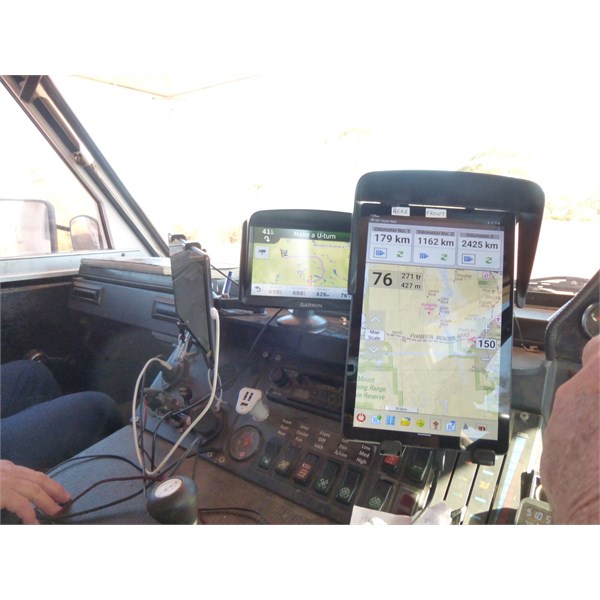
Tablet
Cheers,
Peter
OKA196 motorhome
AnswerID:
648992
Reply By: ExplorOz - David & Michelle - Tuesday, Mar 03, 2026 at 15:22
Tuesday, Mar 03, 2026 at 15:22
In Version 10 of Traveller we introduced a completely new map engine along with a repackaged
EOTopo mapset (any supported edition). The outcome is higher detail with smaller overall file sizes.
REQUIRED STORAGE:
Base
EOTopo (LoRes + HiRes = full resolution roads/tracks with vector zoom to level 20): ~2.5GB
Contours pack (optional): ~2.5GB
Terrain shading pack (optional): ~1.3GB
TOTAL for everything installed: ~6.4GB
During development of v10 we did not anticipate that SD card storage would cease functioning under the new engine architecture. Once identified, we investigated whether this could be resolved. Unfortunately it could not be implemented in a stable, secure way without significant redevelopment.
Given:
The relatively small total storage requirement (6.4GB)
The fact that most modern devices now use larger internal storage
The very low number of users affected (we’ve seen no increase in support load since release)
—we have made the decision not to reinvest development time into restoring SD card support.
It’s also important to clarify that Traveller has never supported map transfer between devices via SD card. Offline map licences are account-based and protected, and map files cannot be copied between devices. That remains unchanged in Version 10. There is therefore no change to portability compared to previous versions.
The shift away from SD storage is primarily a reflection of evolving device standards and the architecture of the new map engine.
We appreciate that a small number of users may prefer SD storage, but based on usage data the practical impact appears minimal.
Hope this helps clarify,
Michelle
AnswerID:
648993
Follow Up By: SIRION - Tuesday, Mar 03, 2026 at 16:48
Tuesday, Mar 03, 2026 at 16:48
Why cannot get any of the selected
Places to show on the map?
FollowupID:
930645
Follow Up By: ExplorOz - David & Michelle - Wednesday, Mar 04, 2026 at 01:21
Wednesday, Mar 04, 2026 at 01:21
Hi Sirion,
Sorry its not possible for us to help you via the
Forum but if you log a support ticket on the Help Desk we can go from there.
FollowupID:
930648