Smart World AI Box Issue
Submitted: Saturday, Jun 13, 2026 at 07:53
ThreadID: 152712
Views:202
Replies:1
FollowUps:0
Member - ValueRider
I recently installed the Smart World AI Android box in a 2020 Triton GLS with the USB Android Auto connection. I was able to install the Traveller App and a number of other apps. That is all good, except the unit is really slow and the user interface of the android device is not that great.
The issue I am having at the moment is that audio from android apps is not coming through the head unit / speakers. I do get audio notifications from the device OS - for example when the OS confirms actions when using voice commands. But I am not getting any audio from youtube or VLC apps for example. I haven't tried getting audio from Traveller app when doing turn-by-turn navigation. Just haven't had a chance to try it yet.
I can't find any settings on the device indicating that audio should go through Android Auto USB. It may be possible that audio is going through bluetooth, but i can't disable bluetooth. I have left a message with Smart World, but haven't heard back from them yet.
Does anyone here have experience with this and know how to fix it?
Reply By: Kazza055 - Sunday, Jun 14, 2026 at 17:24
Sunday, Jun 14, 2026 at 17:24
Hi VR, I was thinking that someone else might have comeback to you but doesn't seem to have happened so I will give you my 2 Bob's worth.
The head unit in my 2023 car came with maps from 2022 and by 2025 the maps were
well out of date. Long story short, I tried updating them and bricked the navigation app so looked at options to fix my situation.
Basically I purchased a similar unit to you with the intention of using it as a permanently plugged in device with my music collection stored on a SD memory card and the ability to load whatever navigation app plus others that I could use off line without needing to use my phone.
Out of the box, it worked but not exactly the way I wanted it so after much searching and trials I ended up installing a new Launcher called
AGAMA. If you watch the Youtube video you will learn how a launcher works and in particular how to use AGAMA.
AGAMA allows you to load up your apps onto the home screen and is very flexible in how you can configure it.
This is how I set the home screen -
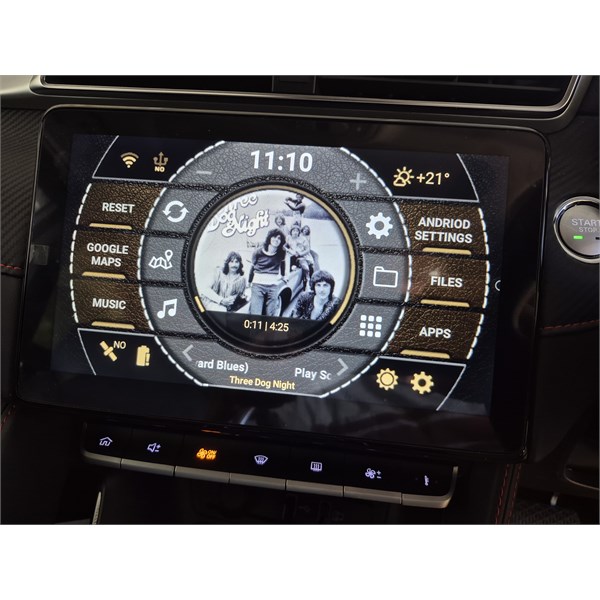
Home Screen
Took me a while to configure it but there is plenty of info on the net to learn from.
A launch is like basically a screen start up app that you set as default to override the original home screen. While you are learning how to have it work, just run up the AGAMA app once you are in the original home screen. My first try, I stuffed up and ended up needing to do a factory reset to get the original setup back running but only once.
Hope this helps even though I have not directly answered all your questions.
AnswerID:
649310