Updating maps for Ausy Explorer
Submitted: Tuesday, Oct 16, 2012 at 21:05
ThreadID:
98587
Views:
2222
Replies:
4
FollowUps:
3
This Thread has been Archived
Eric Experience
Sorry if this has been done before. I have a PC loaded with every map I can find, On my last trip I found that some of the maps are so old that the roads we were on were not on the screen. Has anyone got a way to go through the maps and list the dates of each one. Also is there someone who would take my pc and update the maps to the latest available. Some form of reward would be organized. Eric.
Reply By: equinox - Tuesday, Oct 16, 2012 at 21:25
Tuesday, Oct 16, 2012 at 21:25
Hi Eric,
Check the legend on the map, it should give you an idea of the map epoch.

Extract from legend
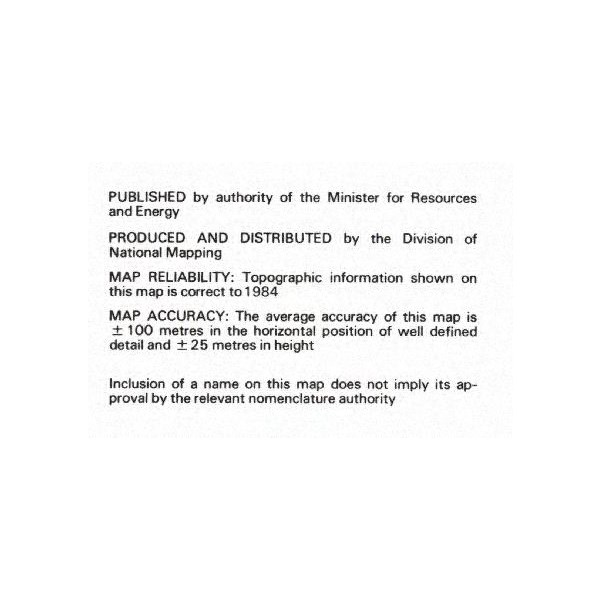
Extract from legend
Cheers
Alan
AnswerID:
496816
Reply By: olcoolone - Tuesday, Oct 16, 2012 at 22:00
Tuesday, Oct 16, 2012 at 22:00
Chances are you have the most up to date maps available ....... some maps that are current may be 20 years old or more.
Most maps these day only get updated when someone pay for the area to be resurveyed like exploration and mining company's.
Selective touristy area get updated more often but only the
well driven tracks.... the Simpson is a classic example, the main super highways in the Simpson may only be a couple of years old but go 10 foot of the track and you might step back 20 years.
Over time roads and tracks may be made, shifted due to flooding or alignment and may not shown on current maps.
We find satellite imagery maps are a bit more up to date.
AnswerID:
496820
Reply By: get outmore - Wednesday, Oct 17, 2012 at 06:53
Wednesday, Oct 17, 2012 at 06:53
old maps can be good, finding little used tracks or features such as old wells which arnt on new maps etc
you can never have too many maps
AnswerID:
496834
Reply By: Burnabbie - Thursday, Oct 18, 2012 at 20:26
Thursday, Oct 18, 2012 at 20:26
hi Eric go to this site and download Auslig maps for free
https://www.ga.gov.au/products/servlet/controller?event=DEFINE_PRODUCTS
very simple to do
AnswerID:
496931
Follow Up By: Burnabbie - Thursday, Oct 18, 2012 at 20:27
Thursday, Oct 18, 2012 at 20:27
if you need more help email me
FollowupID:
772670
Follow Up By: Eric Experience - Thursday, Oct 18, 2012 at 21:42
Thursday, Oct 18, 2012 at 21:42
Burnabbie.
Thanks very much for the link. I can see the list of maps but have had no luck in downloading any, I probably do not have the software to open them. Eric.
FollowupID:
772677
Follow Up By: Burnabbie - Tuesday, Oct 23, 2012 at 20:38
Tuesday, Oct 23, 2012 at 20:38
the download proceedure is tick the map or maps you want and download as ECW file once this is done import the map in to Ozi explorer via file/ import ecw maps.
FollowupID:
773017