Converting PDF to Photograph
Submitted: Tuesday, Nov 13, 2012 at 11:21
ThreadID:
98994
Views:
3333
Replies:
4
FollowUps:
13
This Thread has been Archived
Gone Bush (WA)
On an earlier Thread I posted a photo of a brochure that I originally downloaded as a PDF file. Converting a PDF to a photo usually involves a few steps with special software.
It's easy if you do this:
I downloaded the PDF file to my iPad using the Safari browser. I also have the Kindle app on my iPad. When you have the Kindle app, the iPad automatically prompts you to open the PDF in Kindle, which I always do. Then I have it stored for easy reading at any time.
If you open the PDF in Kindle on the iPad you can take a screen shot, a photo, of it by pressing the iPad's Home button and ON/OFF switch at the same time.
It is in .PNG format, not .JPG, but that's OK, it's still a photo that you can upload etc like any other photo.
Reply By: Allan B (Member, SunCoast) - Tuesday, Nov 13, 2012 at 12:50
Tuesday, Nov 13, 2012 at 12:50
Hi Gone Bush,
I'm really not trying to make you jealous, honestly!
But if you had a Mac, all you need to do is press "Command-Shift-3" and the entire screen image is copied to your desktop in .PNG format.
If you wish to select only a portion of the screen image then press "Command-Shift-4" and a mouse-controlled cursor allows you to select the required portion.
This capture feature is part of the Mac operating system.
As you say, the .PNG format (Portable Network Graphics) is not JPG but is pretty universal. They upload here for example, below.
But to enjoy such benefits you would need to come over to The Dark Side. LOL
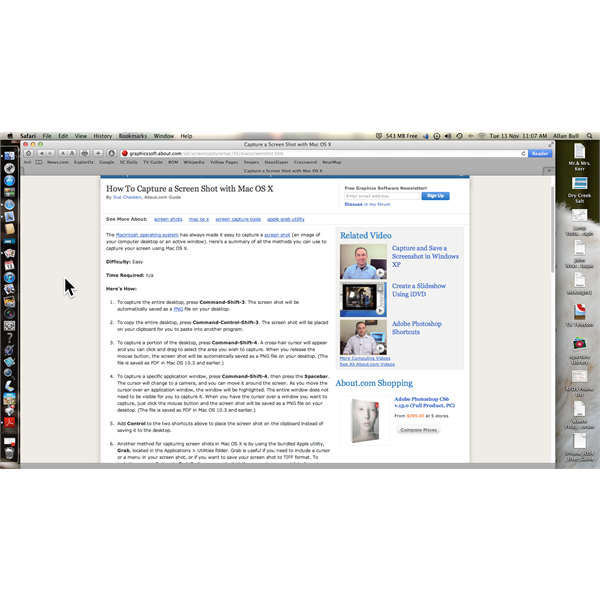
Full screen capture
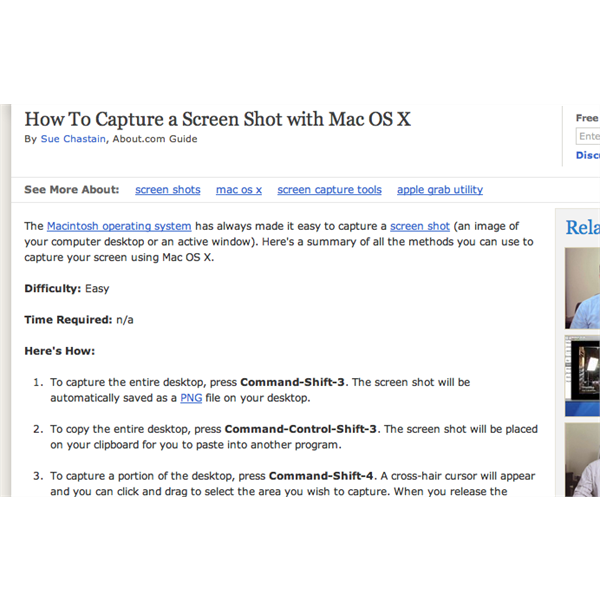
Portion screen capture
AnswerID:
498430
Follow Up By: Gone Bush (WA) - Tuesday, Nov 13, 2012 at 13:33
Tuesday, Nov 13, 2012 at 13:33
Hullo Allan,
I was tempted by the dark side once but I fought it.
The iPad is nice, but frustrating in its limitations, although I do like my iPhone.
When the Microsoft Surface Pro comes out, I think that will replace the iPad.
cheers.
FollowupID:
774419
Follow Up By: Member - Tony V (NSW) - Tuesday, Nov 13, 2012 at 17:50
Tuesday, Nov 13, 2012 at 17:50
Or on Windows its ALT printscreen.... has been since the start of windows...
FollowupID:
774429
Follow Up By: olcoolone - Tuesday, Nov 13, 2012 at 20:24
Tuesday, Nov 13, 2012 at 20:24
Or you use Snagit or one of the many other screen capture software available.
FollowupID:
774437
Follow Up By: Member - Chris & Debi (QLD) - Tuesday, Nov 13, 2012 at 21:12
Tuesday, Nov 13, 2012 at 21:12
Or on Windows 8, you can use WinKey + PrnScr to save a screen capture straight to My Pictures Folder.
FollowupID:
774440
Follow Up By: Member - wicket - Wednesday, Nov 14, 2012 at 12:17
Wednesday, Nov 14, 2012 at 12:17
Or on Win 7 you can use the Snipping Tool
FollowupID:
774479
Reply By: HGMonaro - Tuesday, Nov 13, 2012 at 14:53
Tuesday, Nov 13, 2012 at 14:53
While screen captures may get the info they are not the ideal way as you are limited by the screen resolution, which is most likely lower than 'a photograph'. Adobe Photoshop opens PDFs and converts to something that can be saved as a jpg/png/whatever (you may need to flatten any layers depending on chosen format) but there are probably other programs also that will do similar.
AnswerID:
498434
Follow Up By: ROODOO2 - Tuesday, Nov 13, 2012 at 15:25
Tuesday, Nov 13, 2012 at 15:25
I second Photoshop .
Photoshop Elements also renders vector images (eg PDF ) to raster ( jpeg png etc at a more affordable cost. The big advantage is selectable resolution ,quality etc , something a screen shot fails on IMO.
MIKE
FollowupID:
774424
Follow Up By: Member - PJR (NSW) - Wednesday, Nov 14, 2012 at 11:46
Wednesday, Nov 14, 2012 at 11:46
Yep Photoshop will do it BUT at what cost. I used photoshop free trial to merge a bunch of photos into a panorama. Excellent stuff.
Then I looked for the price. I saw something above $1000 and stopped immediately.
Did I find the wrong Photoshop?
Phil
FollowupID:
774470
Follow Up By: HGMonaro - Wednesday, Nov 14, 2012 at 11:55
Wednesday, Nov 14, 2012 at 11:55
yep, you've seen the 'full blown' one which you don't really need. Elements does it too and that's closer to $100 (not sure what the latest pricing is) but there are probably others that will do it for less (maybe GIMP which is free). For panorama software, try Microsoft ICE, free and works great.
FollowupID:
774473
Follow Up By: Member - PJR (NSW) - Wednesday, Nov 14, 2012 at 12:00
Wednesday, Nov 14, 2012 at 12:00
Whats this "elements" that you mentioned. I don't mind paying.
Phil
FollowupID:
774474
Follow Up By: Allan B (Member, SunCoast) - Wednesday, Nov 14, 2012 at 12:02
Wednesday, Nov 14, 2012 at 12:02
Yes, Photoshop Elements is good value for money. It is less cluttered with features than the full version hence easier to use yet still provides a lot of performance.
FollowupID:
774475
Follow Up By: Member - PJR (NSW) - Wednesday, Nov 14, 2012 at 12:09
Wednesday, Nov 14, 2012 at 12:09
I was just reading the features. Looks like the right one for us.
First we have to pay for the kitchen.
Thanks
Phil
FollowupID:
774478
Reply By: Member - John and Val - Tuesday, Nov 13, 2012 at 17:56
Tuesday, Nov 13, 2012 at 17:56
Hi Gone Bush,
To convert almost anything to almost anything else using windows (I've only used the pdf to jpg, and word or publisher to pdf conversion, but it will handle a lot of others) suggest try 995 Omniformat. It appears to be full commercial software, with a free version (which I use) whose only limitation is that you have to put up with a couple advertisements while it's running. Check it out
here. One trap to be aware of with it - always keep a copy of your original, as it destroys the file it works from when creating the new one.
Conversion to pdf is done using a special printer driver which you use as if it was a printer - it outputs a pdf file rather than a printed document. Other conversions work differently - set the software running and copy your original files into its IN box, they will disappear and be replaced with a file in your target format - that easy. Conversion to jpg is limited to resolutions up to 300 dpi.
Cheers
John
| J and V
"Not everything that can be counted counts, and not everything that counts can be counted."
- Albert Einstein
Lifetime Member
My Profile My Blog Send Message |
AnswerID:
498442
Reply By: pop2jocem - Wednesday, Nov 14, 2012 at 11:15
Wednesday, Nov 14, 2012 at 11:15
Hmmph, I thought an iPad was a Mac...it's got a picture of an apple with a bite (byte?)... oh
well
Anyhow after pressing the little button to start its "motor" then what???
With English sub-titles please ..lol
Just bought one for her-in-doors so she can talk face to face with the grandkids...would have been cheaper to drive there.
Cheers
Pop
AnswerID:
498486
Follow Up By: Allan B (Member, SunCoast) - Wednesday, Nov 14, 2012 at 11:33
Wednesday, Nov 14, 2012 at 11:33
Nah Pop, its an Apple but not a Mac. Oh no, not a Mac mate.
Then what? Maybe
here? Sub-titles to follow.
Cheaper to drive maybe, but think of the brownie points you gained from the iPad gift.
FollowupID:
774468
Follow Up By: pop2jocem - Wednesday, Nov 14, 2012 at 20:18
Wednesday, Nov 14, 2012 at 20:18
Aha, so that's when an Apple is not an Apple.....so to speak.
Hey even a computa newby like me followed most of what he had to say, thanks for that Allan.
Oh yeah muchus brownie points, almost offset my deficit...lol
Cheers mate
Pop
FollowupID:
774500