How do you add photos to places?
Submitted: Friday, Dec 28, 2012 at 09:16
ThreadID:
99670
Views:
2740
Replies:
5
FollowUps:
2
This Thread has been Archived
D&G
I wish to add a photo, don't seem able to- what am i doing wrong?
Reply By: Member - Toyocrusa (NSW) - Friday, Dec 28, 2012 at 10:32
Friday, Dec 28, 2012 at 10:32
Hi. I guess you know but firstly your photo needs to be in a folder on your computor. I have
mine in "Pictures" "Exploroz photos" using Windows Vista. When you ask a question you will see "insert images and files' amoungst the boxes at the bottom. Click on this and browse to your photo folder. Click on the photo you need and click "open" and it will upload. Title the box and it will transfer your photo to your question/post. Then just click on submit or preview if you want look at it first. Cheers,Bob.
AnswerID:
501142
Reply By: Member - John and Val - Friday, Dec 28, 2012 at 12:58
Friday, Dec 28, 2012 at 12:58
Hi D&G,
You have to be a paid-up member to post photos.
Cheers,
Val
| J and V
"Not everything that can be counted counts, and not everything that counts can be counted."
- Albert Einstein
Lifetime Member
My Profile My Blog Send Message |
AnswerID:
501149
Follow Up By: ExplorOz - David & Michelle - Friday, Dec 28, 2012 at 14:25
Friday, Dec 28, 2012 at 14:25
Val,
Not for
places updates - we accept photos from registered users for
places and the reviews/comments systems.
David
FollowupID:
777183
Follow Up By: Member - John and Val - Friday, Dec 28, 2012 at 14:40
Friday, Dec 28, 2012 at 14:40
Sorry David - my mistake! Makes sense to do it that way.
Cheers,
Val.
| J and V
"Not everything that can be counted counts, and not everything that counts can be counted."
- Albert Einstein
Lifetime Member
My Profile My Blog Send Message |
FollowupID:
777185
Reply By: ExplorOz - David & Michelle - Friday, Dec 28, 2012 at 14:30
Friday, Dec 28, 2012 at 14:30
D&G,
as you are logged on to the system (you need to be to use the
forum) then we you open a place page you should see a Add Photos & Files button
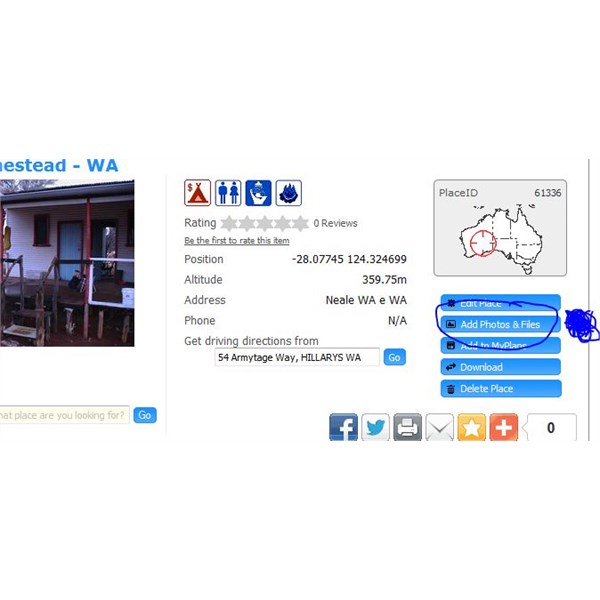
Screen Capture - Places Add Photos
click this and you should be able to select one or many photos at once and the system will prompt you to put in a title and description. That should be it. You need to be on the place page to do this.
The above capture was from page
Old Yeo Homestead - WA
AnswerID:
501152
Reply By: D&G - Friday, Dec 28, 2012 at 16:12
Friday, Dec 28, 2012 at 16:12
thanks to all will give it a go now
AnswerID:
501159
Reply By: Mick O - Saturday, Dec 29, 2012 at 08:11
Saturday, Dec 29, 2012 at 08:11
The other thing to consider is the file size of the photo. You really need to reduce the file size to under a meg to have it load quickly. Original sized image files may be 2 meg or more and they take many minutes to load. 500kb to 1 meg will load very quickly. Check photo file size and reduce accordingly.
Cheers. Mick
| ''We knew from the experience of well-known travelers that the
trip would doubtless be attended with much hardship.''
Richard Maurice - 1903Lifetime Member
My Profile My Blog Send Message |
AnswerID:
501195