|
13th July, 2025
Hi ExplorOz Reader
This edition covers tweaks, tips, and the new “Trek Sharing” update in v9.5.
Dive in, pick what grabs you, and get involved. It's a big one!
Trouble Accessing Treks?
If you're seeing spinning icons or having trouble searching Treks after the recent update, don't
worry — it's an easy fix. Just refresh your app content to ensure the update applies properly. It
only takes a few minutes. Here's what to do:
Go to Menu > Data Manager, scroll to the bottom and tap Clear Content (do not clear
maps). Then just tap the Content Download button again to refresh your database.
Maps not Showing?
If your maps aren't appearing after the update, a simple restart usually does the trick. Just
close
the app completely and reopen it. This takes only a few seconds and ensures the map engine
is restarted.
This refreshes the map engine and should restore your view — whether you're online or offline, the
map will reopen right where you left off.
Android asking for an Internet Connection?A small number of users have reported seeing a
message on Android headunits saying the Traveller app needs to go online. This isn't caused by the
Traveller app — it's a known issue with the Google Play Store app or Google Play Services. The good news
is, you don't need to change anything in Traveller.
What to do:
Clear the cache and data for Google Play Store and Play Services.
Follow these
official Google
Support
Instructions
Quick Steps to Help Improve the App
Thanks to everyone who's jumped in to help with updating and adding Places — your contributions are
making a real difference!.
We gave some tips in our last newsletter (refresh your memory here). To help
even more, here are a few quick pointers to ensure your edits are as helpful as possible:
- Choose the right Place Type- this controls the map icon. If it's wrong, feel free to fix
it.
- Add Features -there are around 80 to choose from, and in v9.5 we've made it even easier
with new
groupings into categories covering
Access, Amenities, Services, Activities, and Limitations. Use as many as apply — they show up as
icons when tapping a Place on the map.
- Features & Types are also filters - so including them helps others search more
effectively.
- Add a photo - either take one in-app with the Camera or choose from your Gallery.
- Add Contact details - especially the website, which is important for booking sites.
- Changes are date-stamped - no need to add date info in the description. See the Review
tab for history.
- Check your Personal Places - if appropriate, you can switch some to “ExplorOz” so others
can benefit. Just avoid duplicates!
- See something wrong but can't fix it? Use the Review tab to send a request to
Admin - even works offline.
Move a Place - if it's in the wrong spot and isn't locked, you can tap and drag it to
the correct location. (Towns and some Places are locked by Admin.)
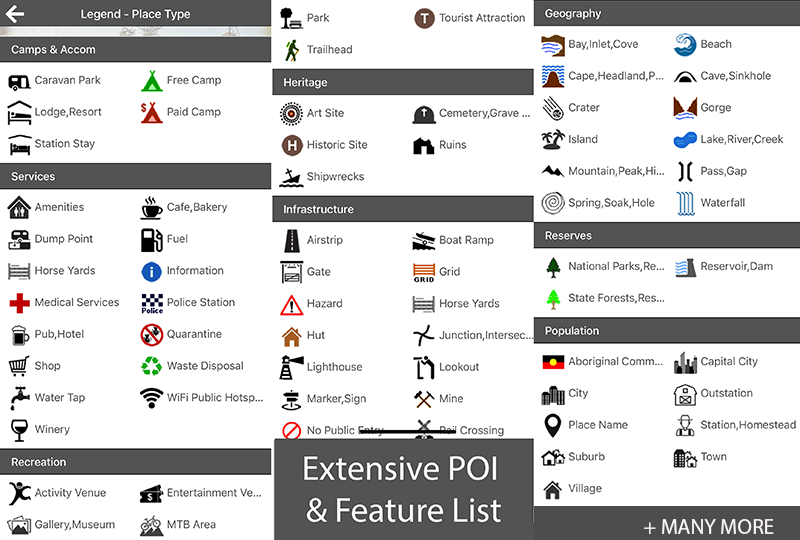
Places Made Easy
All apps handle POIs differently - here's what works best for
Traveller:
- Rest Areas - only mark as a Camp if camping is a key feature.
- Separate Markers - for example, if a pub or roadhouse has camping out the back, place a
second marker for the campsite.
- Trailheads use the Trailhead POI at the start of the walk. Add separate markers for
endpoints like lookouts or waterfalls.
Correct POIs for Camps
- National Park campsites (with booking fees) = Paid Camp
- Donation camp = Paid Camp + add the "Donation" feature
- RV Sites (not caravan parks) = Paid or Free Camp + add "Self Contained" feature
- Hikers camps = Paid or Free Camp + add "Tents/Swag Only" feature
We've recently added heaps of new Features to popular POI types. You'll be able to spot and apply
these more easily once the v9.5 update lands — it includes new icons for all the updated Places!
Thanks again for being part of the ExplorOz community. Every little contribution helps make the
app better for everyone..
Use Filters & Sort
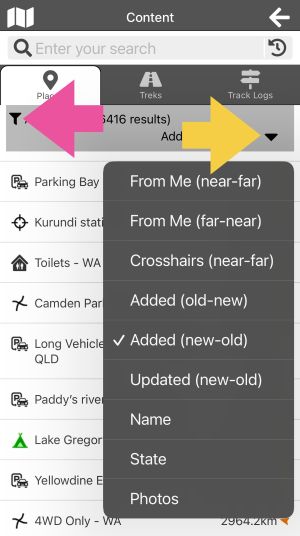 |
Speed up your Content Search and simplify the results using Filters (Pink), and Sort Order
(Yellow) options. Apply Filters and change the Sort in Places, Treks, and Track Logs. Give it a
go! |
Trek Sharing & v9.5 Beta - Can You Help?
Version 9.5 is now in beta (public testing) - and it includes the long-awaited Trek Sharing
feature! Trek Sharing works exactly like Track Log sharing, so it should feel familiar. We're keen
for you to test it out and let us know how it performs. Available for Android and Apple iOS.
For Apple test users you can get the new v9.5 Test Flight program
here
For Android test users you can join the new v9.5 beta
test program here
Beta testing plays a vital role in refining the app by allowing real users to try out new
features in everyday scenarios. Being a Beta test user means you just use the app like your regular
app,
but you've got access to a version with
upcoming updates included. If you join the program however, you must be prepared to
open the app and "test" the new Trek Sharing feature in the next couple of days. This means
make a few of your Personal Treks "Shareable" and "Open" and then share them with someone else you
know who uses the Traveller app.
We simply ask that you send us your feedback in the next few days (the good and the not-so-good) via
the Beta feedback
tool built into the Beta program. Let's get some good testing done on this important feature before
we
lock in the public release.
CarPlay, Android Auto & Headunit Tips

We've done the hard yards testing and researching to bring you the best tips and solutions.
Head to the Traveller webpage and open
the tab labelled "CarPlay, Android Auto & Adapters".
You'll find everything from setup tips to gear recommendations — whether you're fitting out your
car, 4WD, or even your motorbike.
And yes, we've included videos too — so it's all easy to follow. Jump in and get connected!
Connect with Other App Users
Join the ExplorOz Traveller App User Group on Facebook — it's
a friendly,
helpful space where fellow users share travel stories, general travel tips, ask app questions, and
swap ideas.
We also post regular “Tip of the Day” content to help you get the most from the app.
It's the perfect place to get quick answers without needing to raise a support ticket.
|