Travel times in Treks
Submitted: Sunday, Feb 16, 2025 at 00:01
ThreadID:
149659
Views:
3874
Replies:
6
FollowUps:
19
This Thread has been Archived
Member - TJBF250
Hi, I'm a new user and seek assistance. I'm presently planning a trip from
Perth WA to
Meekatharra to
Mount Augustus to
Gascoyne Junction to
Carnarvon to
Exmouth. I had commenced planning this prior to purchasing
ExplorOz Traveller.
My query is specifically about the leg from
Mount Augustus to
Temple Gorge Kennedy Ranges. Travel distance using Google maps and ExplorOz are both 270km. This is travelling initially NW toward Bangemall then follow Edmund Gifford
Creek road to Lyons
River crossing (Cobra Gifford
Creek Rd) then Illawarra Road to Kennedy Rnges). Travel time using google is 4h10m and ExplorOz 10h35m.
Not having travelled this route, and I cannot find any ExplorOz treks, I'm uncertain which is correct. However, I've also found that
Temple Gorge to Yardi
Homestead is stated as 6hr 41min using google maps and 9hr 23min with ExplorOz. So I am questioning the ExplorOz travel times.
I've queried this with the help desk and was given the following reply " ... The auto routing calculator is an online service that operates externally to our software and we have no control over its data."
I'm wondering if any other ExplorOz users have found similar discrepancies on other treks and how they determine which is more accurate? Appreciate your time . Thanks. Trevor
Reply By: Member - nick boab - Sunday, Feb 16, 2025 at 09:06
Sunday, Feb 16, 2025 at 09:06
Trevor : the Google calculator time is probably worked out on an average
unsealed road
In the app try changing your average
speed calculator maybe to cycle ..I think you can change the speed ?
AnswerID:
647408
Follow Up By: Member - TJBF250 - Sunday, Feb 16, 2025 at 10:42
Sunday, Feb 16, 2025 at 10:42
Hi Nick,
Thanks for the comment. When you suggest "in the app" do you mean in google maps? So you're suggesting that google may be incorrect?
ExplorOz treks is set to driving mode. However, after reading your reply I've changed it to cycling and noted that the travel time did not change. I saved the trek to see what might trigger a recalculation. I changed from cycling to walking to driving. I could not find any way to cause ExplorOz to actually recalculate the time even though the text message "recalculating route segments" appears on the screen. After closing the web browser and starting ExplorOz again I can now say that I can create a recalculate. By changing the selecting mode in trek navigation and choosing the new mode, then select the segment of the trek, swipe Left and selecting navigate icon brings up the "turn by turn calculated" window. When I select "accept" causes a recalculate and now the travel time by driving that segment is 5h39m.
So it appears that although "driving' had been selected at commencement of creating the trek, the mode for the selected segment may have defaulted to cycling to give a 10h35m travel time. It appears that the user can over-ride the mode for particular segment but it may be that the user must check each segment.
Thank you for promoting me to think outside the box.
I'm now in the quandary of deciding if the planned segment should be driven or not. If ExplorOz default is cycling then maybe some more research is required before I set off towing a van along that route.
FollowupID:
928386
Follow Up By: Member - nick boab - Sunday, Feb 16, 2025 at 11:11
Sunday, Feb 16, 2025 at 11:11
Trevor you have been busy lol
another way might be to calculate the time it would take , maybe work out what the average speed might be & calculate the time from that . Either way it's still bit of conjecture i guess.
In
explorers YouTube tutorials there is what I think is a reasonably in depth video on this that David has demonstrated .
Cheers
FollowupID:
928389
Follow Up By: Member - TJBF250 - Sunday, Feb 16, 2025 at 13:02
Sunday, Feb 16, 2025 at 13:02
Hi Nick,
Thanks for more info. Do you mean the "Blogs" to locate the Utube tutorials? I've clicked one the underlined "explorers"in your reply but all I see is history info about early
explorers. No links to tube.
I don't understand how I can work out any average speed when I don't know the state of the road/track. I don't understand why ExplorOz gives a default 10h35m travel time when driving is selected! Is there track that bad and that's why it takes so long. Changing the default mode only gives an updated time not any confidence in whether the road/track can be travelled by vehicle.
I have reached out to Information centres in that area to get firm factual info.
FollowupID:
928393
Follow Up By: Member - nick boab - Sunday, Feb 16, 2025 at 13:24
Sunday, Feb 16, 2025 at 13:24
Trevor:
ExplorOz tutorials on YouTube
Working out the road conditions and the time its going to take is all very much guesswork in these type of location unlike a hwy .
I too thought that the traveller app times were quite conservative but 67 km an hour/average would not be slow on a outback track especially if Towing .
FollowupID:
928394
Follow Up By: Member - nick boab - Sunday, Feb 16, 2025 at 17:20
Sunday, Feb 16, 2025 at 17:20
Trevor. I have been playing around with the navigation this afternoon .
After reading through what you said in your first reply I have been changing from driving and walking cycling now back to driving again I have now noticed that theres a average speed box in the term by turn calculator box which can be adjusted which I didn't notice before , as you change the average speed the speed on the track changes accordingly b4 accepting track .
The Edmund Gifford ck track section could be slow going for over 50 kilometers keeping the average speed down .
Did you get anything out of the link from the tutorial
FollowupID:
928409
Follow Up By: Member - nick boab - Sunday, Feb 16, 2025 at 17:31
Sunday, Feb 16, 2025 at 17:31
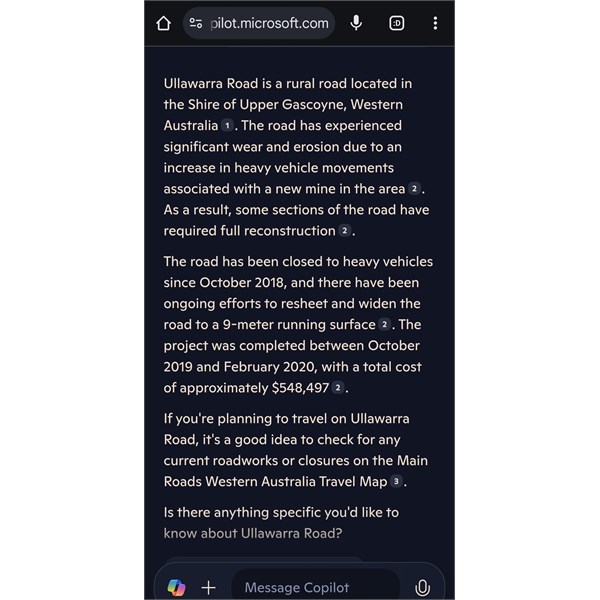
Illawarra Rd wa
Couldn't get any information on the Edmund Gifford
Creek Road .
FollowupID:
928411
Reply By: Member - Dick L - Sunday, Feb 16, 2025 at 13:04
Sunday, Feb 16, 2025 at 13:04
When I do
Temple Gorge to Yardi
Creek I get two choices top left of map screen.
1. Eastern route via
Carnarvon 662.5 Kms, 9.53.54 Hours and Avg Speed 67k/h.
2. Western inland route 630 Kms, 9.41.01 Hours and Avg Speed 65.1 k/h.
I would think these are conservative but would go with them rather than Google.
AnswerID:
647409
Reply By: Member - TJBF250 - Monday, Feb 17, 2025 at 00:41
Monday, Feb 17, 2025 at 00:41
Hi Gents,
Thanks for your time and effort. As I write this I'm unable to review your replies so sorry if I miss something. I must apologise for not recalling the tutorials noted on the bottom of the first help guides. I've looked to see where I might find them after reading your reply. I'll look through and watch some of these tutorials in the next few days.
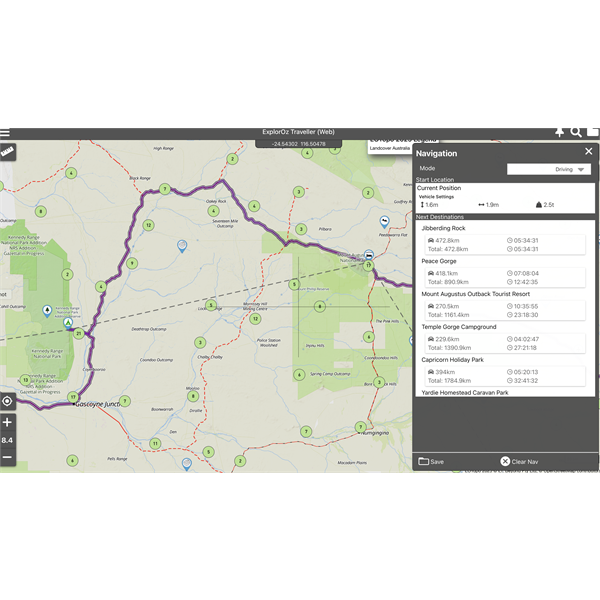
Mt Augustus to temple Gorge
When ExplorOz stated 10h35m I noted that the average speed was fifty something which I figured might be appropriate for that area. I'm still lost as tom how a 270km trip averaging say 55kph takes 10h35m. I think I've attached a screenshot via Images & files but can't see it.
Anyway, moving on, can I ask where you obtained that road report from please? I've
forum the shire of Upper Gascoyne road report but nothing as detailed as the one you posted?
I've done a bit of travelling and off-road towing however this is the longest trek and beginning or many more, hence my investment in proper maps. My previous mapping app was suitable for black-top however the route planning was poor after a major upgrade. I'm wanting to feel the
routes and times are reliable before heading bout and getting stuck or delayed.
AnswerID:
647413
Follow Up By: Member - Dick L - Monday, Feb 17, 2025 at 10:12
Monday, Feb 17, 2025 at 10:12
That section works out at approx. 25k/h.
The overall trip works out at 55k/h.
Each section will be faster or slower depending on road conditions.
If you look at your screenshot you can see that sections of similar distances have way different times.
FollowupID:
928421
Reply By: Peter_n_Margaret - Monday, Feb 17, 2025 at 09:33
Monday, Feb 17, 2025 at 09:33
Off topic......................
There is a track up the west side of the
Kennedy Range that goes over the top of the range and down the other side. Great drive, not what you would expect and worth spending a night on the top. Not for caravans.
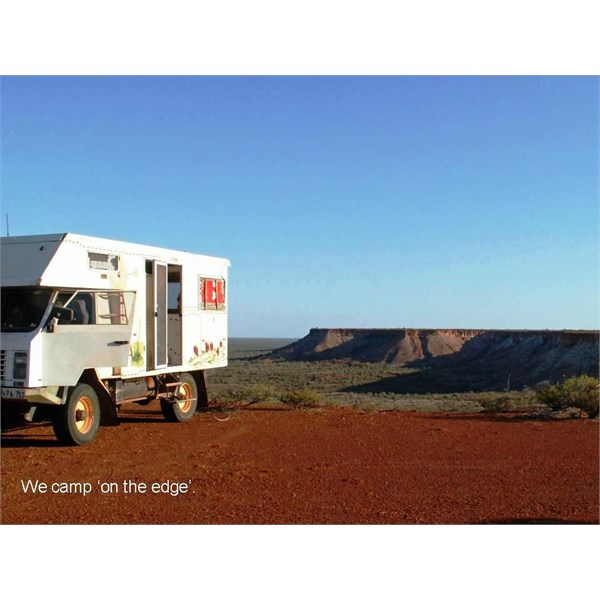
Kennedy Range
Cheers,
Peter
OKA196 motorhome
AnswerID:
647414
Reply By: Member - TJBF250 - Monday, Feb 17, 2025 at 13:38
Monday, Feb 17, 2025 at 13:38
Thanks again gents.
Yes Dick, I'm aware of the different speeds allocated to each segment of the trek. That's what caused my concern. It didn't make any sense to me 270km in 10h35m. my initial post quoted the help desk stating the auto-routing was outsourced so you'd assume that they had good data to support the calculations.
Peter, I'm aware of
the Loop road. We'll plan on driving some of it but not being able to van it means we'll be back to
camp for the night.
AnswerID:
647415
Follow Up By: Member - TJBF250 - Tuesday, Feb 18, 2025 at 00:53
Tuesday, Feb 18, 2025 at 00:53
Here I am again with yet another anomaly. The trek from
Exmouth to
Perth with the specific segment
Carnarvon Rest Stop to Bush Bay Campground about 38km south of
Carnarvon. The route is along the North West Coastal Highway (bitumen).
ExplorOz gives a distance of 285.4km and travel time of 3h28m with the mode of transport as DRIVING. Google maps gives 38km and 27min.
I'm using my MacBook pro and would like to hear if anyone can replicate this. Thanks in advance.
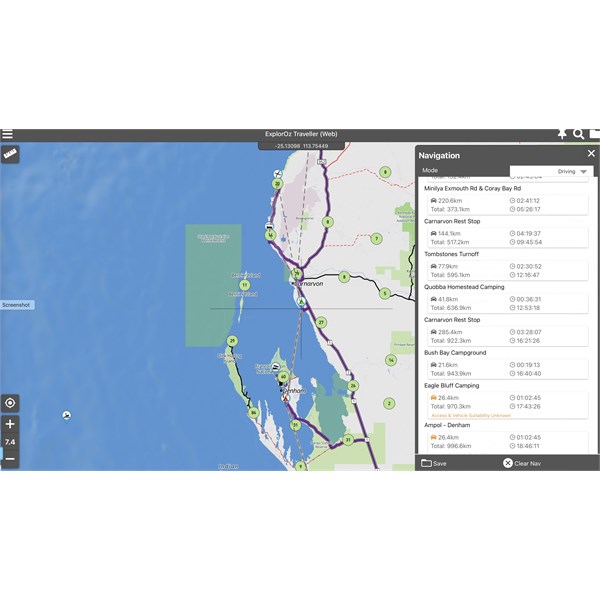
ExplorOz
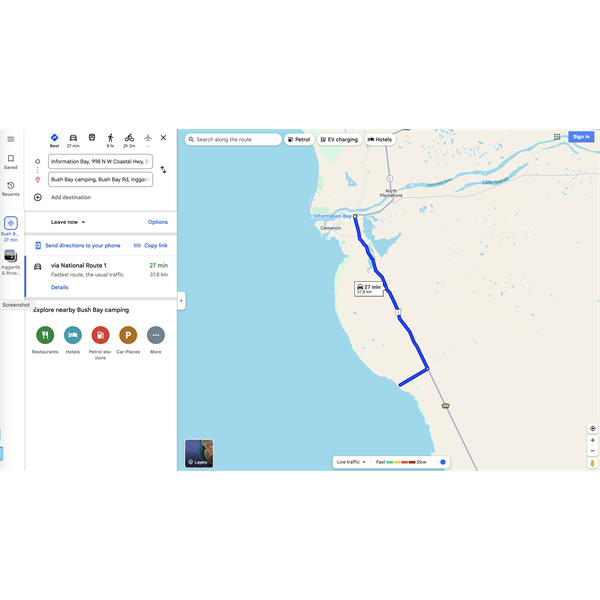
Google
[Image cannot be loaded]
FollowupID:
928440
Follow Up By: Member - nick boab - Tuesday, Feb 18, 2025 at 08:06
Tuesday, Feb 18, 2025 at 08:06
Trevor : I'm not sure if I'm understanding you correctly here & I haven't duplicated your route nor do I have an average
speed calculator but 38 k's in 27 minutes would be around 140k an hour average speed I think
285 km in 3.5 hours would be approximately 80 ks hour average speed
Or are you questioning the distance ?
P.S , I don't think the app is suggesting it is 285k between
Carnarvon S.T and
Bush Camp
21ks ?@
FollowupID:
928441
Follow Up By: Member - TJBF250 - Tuesday, Feb 18, 2025 at 10:47
Tuesday, Feb 18, 2025 at 10:47
Hi Nick,
Thanks for taking the time to consider this issue and offer suggestions.
38km divided by 27/60 = 84kph not 140. You've done 38 divided by 27/100.
So given that about 29km is highway driving (minus a short section exiting
Carnarvon) and 9km is the dirt road from the highway turn-off to Bush Bay
camp, the 84kph seems reasonable.
The distance calculated by ExplorOz of 285km is ridiculous to say the least. Forget the travel time as it's probably the result of the distance divided by a speed associated with that segment of the trek.
If you look at the next segment in the screenshot (Bush Bay Campground to
Eagle Bluff) the distance is calculated as 26.6 km. Once again this is nowhere near correct. It's actually about 260km.
Overnight, Michelle has suggested that I clear content and all treks and try again. Seems strange that apparently it's only me that has found this issue. Maybe it's my latest IOS on the apple MacBook.
I'll update after starting again and I shall also try on my iPad.
FollowupID:
928442
Follow Up By: Member - Dick L - Tuesday, Feb 18, 2025 at 11:04
Tuesday, Feb 18, 2025 at 11:04
You are reading the route information wrong.
When I look at your route from
Carnarvon Rest Area to Bush Bay Campground, I see 21.6 Kms and 0. 19.21hrs .
Look at the information in the destination location not the starting location.
FollowupID:
928443
Follow Up By: Member - nick boab - Tuesday, Feb 18, 2025 at 12:00
Tuesday, Feb 18, 2025 at 12:00
Yes as dick said & about an average speed of 67 I think if my math is right this time hahaha :))
I looked at the accumulative ks went from 922 to 943= 21 . ?
FollowupID:
928444
Follow Up By: Member - nick boab - Tuesday, Feb 18, 2025 at 14:29
Tuesday, Feb 18, 2025 at 14:29
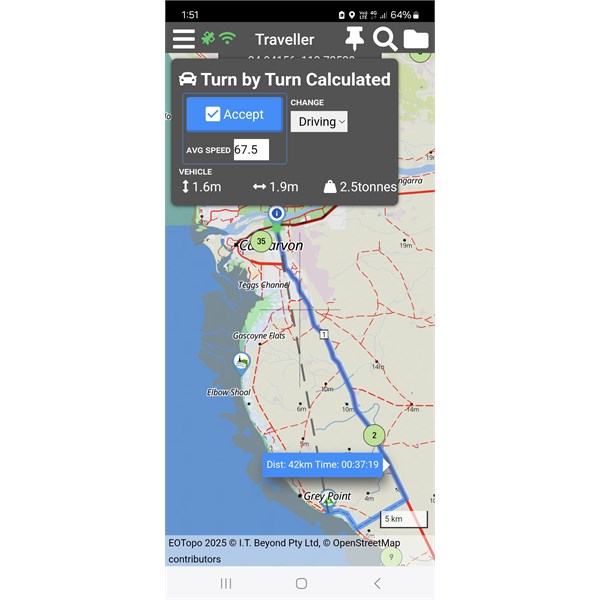
Rest stop / bush day
FollowupID:
928446
Follow Up By: Member - TJBF250 - Tuesday, Feb 18, 2025 at 17:11
Tuesday, Feb 18, 2025 at 17:11
Hi again,
Ok, so you're saying that the distance from one place to the next is listed UNDER the destination? if so, then how does it display the distance of the last leg when the destination is the last line of the Navigation window?
To explain my point, a trek with only a start and destination lists the distance in a box between those
places. if you then add a third place as a new destination then that new leg/segment distance is listed in the new box below the middle place and above the destination. It can't list the distance of the final leg/segment below the destination.
Screenshots attached to show example.
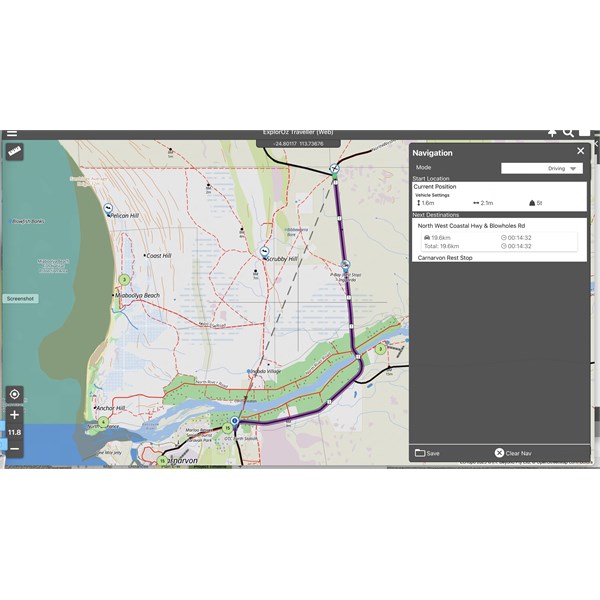
Start and destination
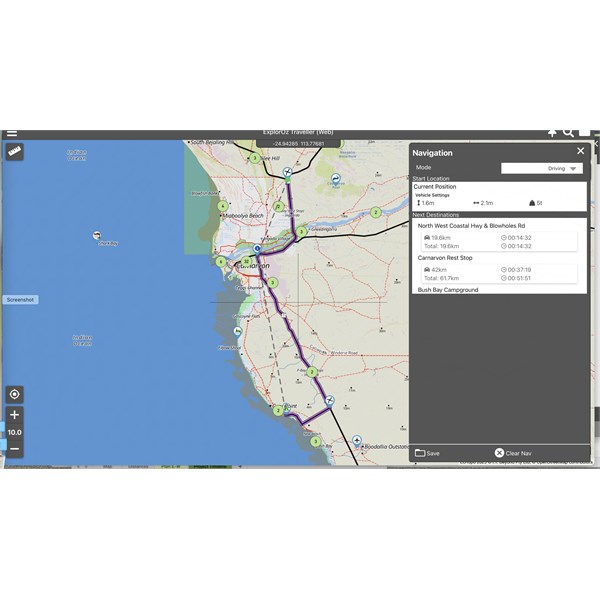
start, middle stop and destination
FollowupID:
928452
Follow Up By: Member - nick boab - Tuesday, Feb 18, 2025 at 18:26
Tuesday, Feb 18, 2025 at 18:26
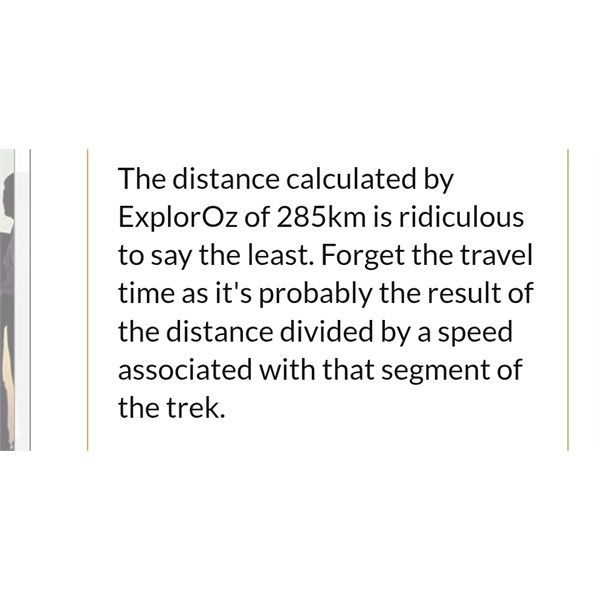
Trevor reply 285 k's
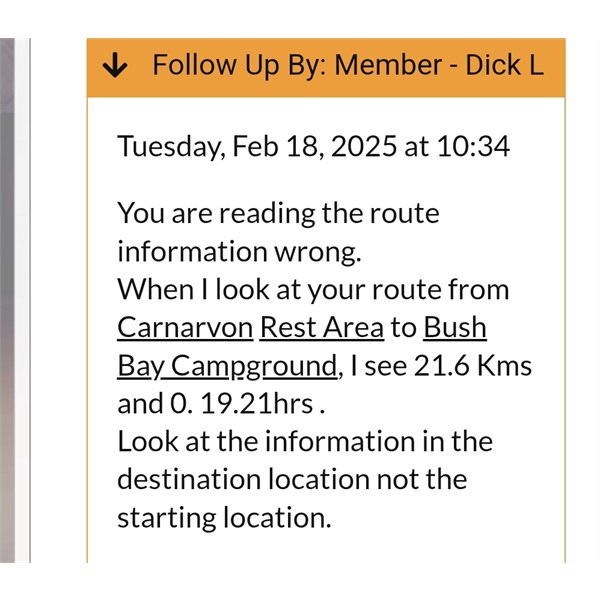
Dicks reply
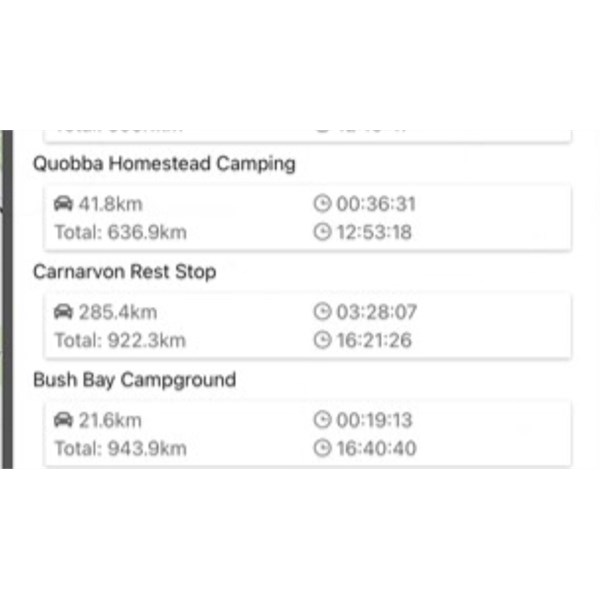
Navigation notes
What I think dick is saying 285 k's is the previous leg and the 21 k's is from
rest stop to bush bay .. by saying underneath .
If that makes sense.
But that doesn't explain why
mine came up with 42 ks for same ...
Carnarvon rest stop to bush bay campground @
FollowupID:
928453
Follow Up By: Member - TJBF250 - Wednesday, Feb 19, 2025 at 10:40
Wednesday, Feb 19, 2025 at 10:40
Yes I get what has been mentioned but it can't be correct. The screenshot I posted shows
Blowholes to
Carnarvon and puts distance between those
places. When a third place is entered, again the distance is between the
places. It cannot be under as there can be no distance displayed for the trip to the last place as there is no room under that place name.
FollowupID:
928459
Reply By: Member - Jim S1 - Wednesday, Feb 19, 2025 at 16:56
Wednesday, Feb 19, 2025 at 16:56
Trevor
I noticed that in your screenshot of Navigation , with a list of points, that you had
Carnarvon Rest Stop listed twice.
My assumption is that the navigation program would then be obliged to go back to
Carnarvon and then return. That would explain some large distances.
If I’m completely confused , very likely, I apologise.
Cheers
Jim
AnswerID:
647433
Follow Up By: Member - nick boab - Wednesday, Feb 19, 2025 at 17:57
Wednesday, Feb 19, 2025 at 17:57
Jim : I didn't notice that before concentrating on the points of interest but that may account for the anomalies in the kilometers between points of interest including the 21 km between
Carnarvon rest stop and bush bay
camping , that is actually 42 kilometers and maybe also the 285 ks in question .
Cheers for pointing that out
FollowupID:
928463
Follow Up By: Member - TJBF250 - Wednesday, Feb 19, 2025 at 23:59
Wednesday, Feb 19, 2025 at 23:59
Hi Jim,
Thanks for considering this issue.
Carnarvon is listed twice as it's a FW fill stop. Arrive
Carnarvon, fill FW, drive to Quobba then return two
Carnarvon to fill FW then proceed to Bush Bay. Simple.
Regardless of how many times the same waypoint appears it should calculate the distance between each stop independent of whether you've been there before of not, don't you think.
Michelle seems to think that the program is corrupted again. I've already cleared all content and all treks and downloaded onto the MacBook and now it appears that I need to do it again.
FollowupID:
928468
Follow Up By: Member - Jim S1 - Thursday, Feb 20, 2025 at 08:36
Thursday, Feb 20, 2025 at 08:36
Thanks Trevor. Does that mean that the order that waypoints are made doesn’t matter ?
I had thought that the route just followed the waypoints in the order made.
Cheers
Jim
FollowupID:
928469